Reviews
Your graphics add a nice touch to my presentations and I recently used them for one of my all-hands meetings. Your toolbox adds professionalism to my slides. Instead of using standard clipart.
I needed a fresh look at some of my slides. I've tried to find a way to create a paintbrush effect, to underline, accentuate, add some color and the handwritten markers were just the things. Very easy to use, easy to size, change the color. It was an affordable, perfect solution and I'm happy to recommend it.
The crisp, clean look of the graphics, and the fact that it allowed me to easily edit and change the colors to match the template was my main reason for purchasing them.
Description
Revenue Highlights Dashboard Template
Slide Content:
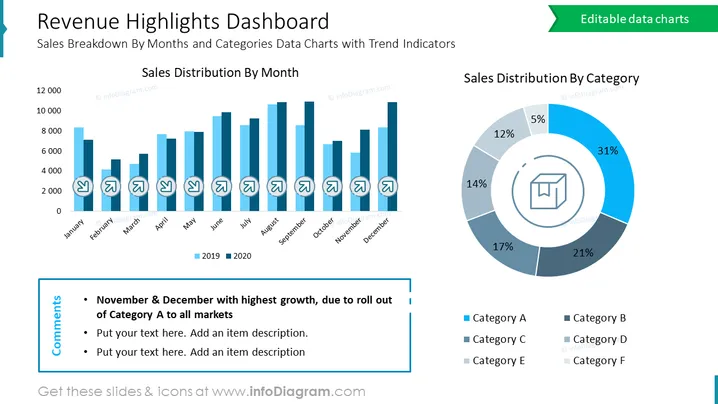
The slide is a financial dashboard that showcases a company's sales performance, segmented by month and category. It features a bar graph comparing monthly sales for two consecutive years, denoting clear trends and growth patterns. Additionally, there's a pie chart that breaks down sales by various product categories, highlighting the most significant contributors to revenue. The slide also includes a comments section for annotations on specific trends or data points, such as a notable increase in November and December due to strategic initiatives.
Graphical Look:
- A bar chart with dual-color bars representing monthly sales for 2019 and 2020, showing trends over the calendar year.
- A circular pie chart with different shades representing the sales distribution by category, complete with percentage labels.
- Trend arrows on the bar chart indicating growth or decline.
- The color scheme is composed of various shades of blue, creating a cohesive and visually appealing display.
- A comment box in the bottom left corner with bullet points for textual notes.
The slide's design is modern and data-centric, with a clear distinction between the graphical representation of sales data and the textual commentary. The use of shades of blue gives the slide a professional and unified appearance.
Use Cases:
This slide would be useful in:
- Business review meetings to analyze sales performance.
- Strategic planning sessions to identify successful product categories.
- Investor presentations to demonstrate revenue growth and diversification.
- Marketing meetings to align sales strategies with performance data.
How to Edit
How to edit text & colors

How to expand / shorten diagram

How to Replace Icons in infoDiagram PPT


