Reviews
Sus gráficos añaden un toque agradable a mis presentaciones y recientemente los usé para una de mis reuniones generales. Su conjunto de herramientas añade profesionalismo a mis diapositivas. En lugar de usar imágenes prediseñadas estándar.
Necesitaba un aspecto fresco para algunas de mis diapositivas. Había intentado encontrar una forma de crear un efecto de pincel, de subrayar, acentuar, añadir algo de color y los marcadores escritos a mano fueron justo lo que necesitaba. Muy fácil de usar, fácil de ajustar el tamaño, cambiar el color. Fue una solución asequible y perfecta, y estoy feliz de recomendarla.
El aspecto nítido y limpio de los gráficos, y el hecho de que me permitiera editar y cambiar fácilmente los colores para que coincidieran con la plantilla fue mi principal razón para comprarlos.
Description
4 KPI Values Presentation Template
Slide Content
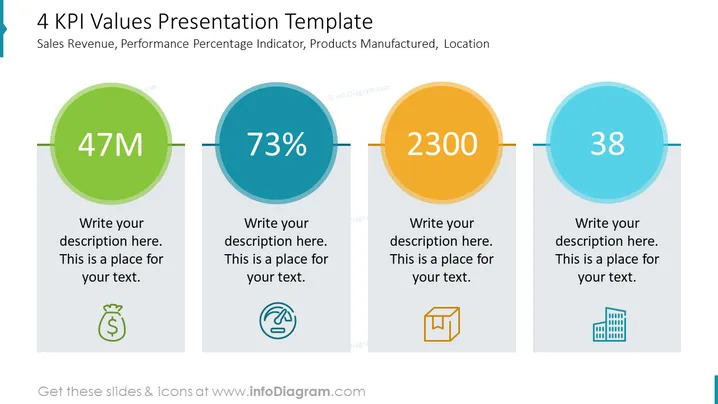
The slide titled "4 KPI Values Presentation Template" displays four different KPI (Key Performance Indicators) metrics relevant to business performance: Sales Revenue, Performance Percentage Indicator, Products Manufactured, and Location. Each KPI is represented by a large colored circle containing a key figure: "47M" and a money bag icon signifying Sales Revenue, "73%" with a circular progress bar icon hinting at performance evaluation, "2300" accompanied by a box icon likely representing the number of products manufactured, and "38" next to a buildings icon possibly indicating the number of locations.
Graphical Look
- Four large circles dominate the slide, each with a bold number in the center: "47M", "73%", "2300", and "38".
- Each circle has a different color: green, blue, orange, and light blue, representing different data points or categories.
- Below each circle, there is placeholder text for additional descriptions, suggesting that the presenter can provide more context to the numbers shown.
- Icons are placed beneath the text, correlating with the KPI they represent: a money bag for revenue, a circular progress bar for performance percentage, a box for products manufactured, and building icon for location.
- A horizontal line connects the circles, implying the flow or relationship between different KPIs.
The slide has a clean and professional design with contrasting, colorful circles that draw attention to the key figures. The icons are simple and communicate the essence of each KPI intuitively.
Use Cases
- Illustrating company performance across various key areas in executive meetings.
- Presenting quarterly or annual results to stakeholders or potential investors.
- Summarizing the main highlights during an internal team or departmental review.
- Incorporating it into a sales proposal to indicate historical success or market position.
How to Edit
How to edit text & colors

How to expand / shorten diagram

How to Replace Icons in infoDiagram PPT


