

Your graphics add a nice touch to my presentations and I recently used them for one of my all-hands meetings. Your toolbox adds professionalism to my slides. Instead of using standard clipart.
Claude Jones, Director of Engineer, @Walmartlabs, USA

Your graphics add a nice touch to my presentations and I recently used them for one of my all-hands meetings. Your toolbox adds professionalism to my slides. Instead of using standard clipart.
Claude Jones, Director of Engineer, @Walmartlabs, USA
I needed a fresh look at some of my slides. I've tried to find a way to create a paintbrush effect, to underline, accentuate, add some color and the handwritten markers were just the things. Very easy to use, easy to size, change the color. It was an affordable, perfect solution and I'm happy to recommend it.
Anonymous, US
The crisp, clean look of the graphics, and the fact that it allowed me to easily edit and change the colors to match the template was my main reason for purchasing them.
Brandie Jenkins, E-learning Developer, USA
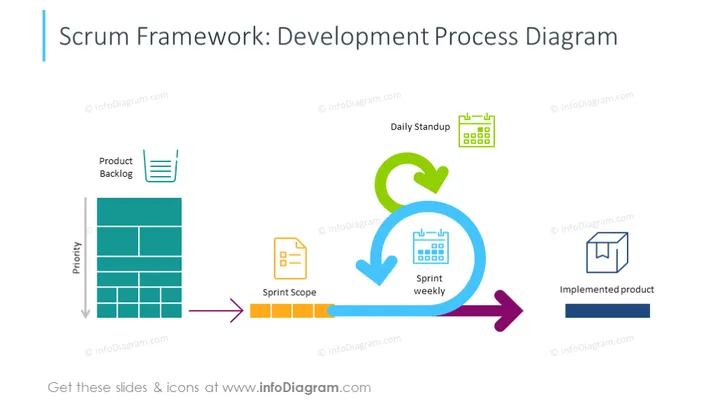
The slide outlines the Scrum framework's development process, a popular agile methodology. It begins with the 'Product Backlog,' a prioritized list of project requirements and tasks. The 'Sprint Scope' defines what will be accomplished in the upcoming sprint. 'Daily Standup' meetings are quick, time-boxed meetings for the team to synchronize activities and plan for the next 24 hours. The 'Sprint weekly' is a cyclical event, where progress is reviewed, and plans are adapted. Finally, the 'Implemented product' represents the end result of the sprint's development efforts.
The overall design of the slide is simple yet effective, using a combination of icons and color to illustrate the sequential steps in the Scrum development process. The arrows create a sense of flow and progression from the backlog to the completed product.



