Your graphics add a nice touch to my presentations and I recently used them for one of my all-hands meetings. Your toolbox adds professionalism to my slides. Instead of using standard clipart.
Claude Jones, Director of Engineer, @Walmartlabs, USA

Your graphics add a nice touch to my presentations and I recently used them for one of my all-hands meetings. Your toolbox adds professionalism to my slides. Instead of using standard clipart.
Claude Jones, Director of Engineer, @Walmartlabs, USA

I needed a fresh look at some of my slides. I've tried to find a way to create a paintbrush effect, to underline, accentuate, add some color and the handwritten markers were just the things. Very easy to use, easy to size, change the color. It was an affordable, perfect solution and I'm happy to recommend it.
Anonymous, US
The crisp, clean look of the graphics, and the fact that it allowed me to easily edit and change the colors to match the template was my main reason for purchasing them.
Brandie Jenkins, E-learning Developer, USA
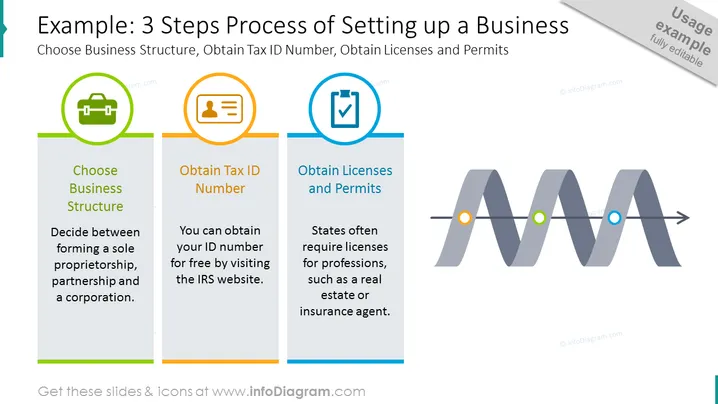
The slide outlines a step-by-step approach to establishing a new business and focuses on three key actions. "Choose Business Structure" is the initial step, which involves deciding between a sole proprietorship, partnership, or corporation, highlighting the importance of selecting the right legal framework. The second step, "Obtain Tax ID Number," suggests visiting the IRS website to obtain the ID for free, emphasizing the necessity to handle taxation matters. The final step, "Obtain Licenses and Permits," underscores the requirement for state-specific professional licenses, like those for real estate or insurance agents, essential for legal operations.
The slide has a modern, clean design with a balance of text, icons, and a prominent process pathway, making it visually engaging and easy to follow. The color scheme and visual elements effectively guide a viewer along the steps in a business setup process.


