Reviews
Vos graphiques ajoutent une belle touche à mes présentations et je les ai récemment utilisés pour l'une de mes réunions générales. Votre boîte à outils ajoute du professionnalisme à mes diapositives. Au lieu d'utiliser des cliparts standards.
J'avais besoin d'un nouveau regard sur certaines de mes diapositives. J'ai essayé de trouver un moyen de créer un effet de pinceau, de souligner, d'accentuer, d'ajouter de la couleur et les marqueurs manuscrits étaient exactement ce qu'il fallait. Très facile à utiliser, facile à ajuster la taille, à changer la couleur. C'était une solution abordable et parfaite et je suis heureux de la recommander.
L'aspect net et épuré des graphiques, et le fait qu'il m'ait permis d'éditer et de changer facilement les couleurs pour les adapter au modèle, ont été les principales raisons de mon achat.
Description
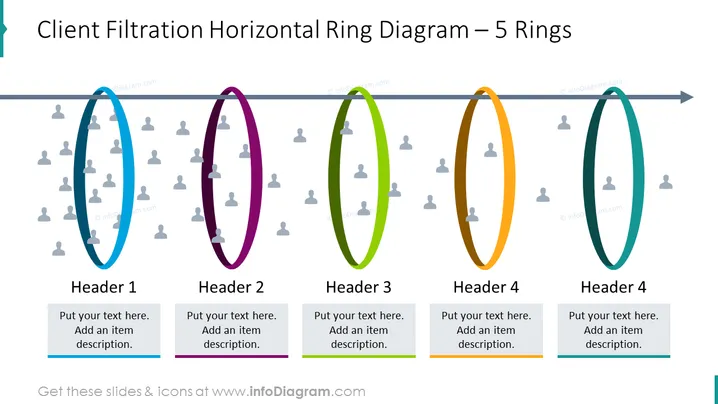
Client Filtration Horizontal Ring Diagram – 5 Rings
Slide Content
The slide presents a "Client Filtration Horizontal Ring Diagram – 5 Rings" used for depicting stages or categories in a process, with a progression indicated by an arrow. Each ring represents a different phase (Header 1 to Header 4, with Header 4 duplicated) in a sequence, with a place for a brief description. The rings provide a platform for customizing text to align with specific processes, ideal for filtering or segmentation concepts in a business context, showing the narrowing down of criteria or selection through different stages.
Graphical Look
- The slide has a light background with a horizontal progression arrow spanning from left to right.
- There are five rings, each with a unique color (blue, purple, green, orange, and teal).
- Inside each ring, there are multiple icons of a simplified person, shaded in a lighter tone than the ring's color.
- Below each ring, there's a text box for a header and additional item description.
- The progression arrow has a darker shade at the end, creating a directional effect.
- The visual elements have a flat design aesthetic with no gradients or shadows.
The overall look of the slide is clean and modern, with a business-like feel due to its systematic layout and use of simple icons. The color-coded rings help distinguish different stages or categories effectively.
Use Cases
- To visually represent stages in a customer journey or sales pipeline.
- For illustrating the process of client selection or segmentation in a marketing presentation.
- As a tool for discussing the filtration of ideas, concepts, or strategies during a business strategy session.
- To showcase the workflow or progression in project management and operational processes.
How to Edit
How to edit text & colors

How to expand / shorten diagram

How to Replace Icons in infoDiagram PPT


