Reviews
Sus gráficos añaden un toque agradable a mis presentaciones y recientemente los usé para una de mis reuniones generales. Su conjunto de herramientas añade profesionalismo a mis diapositivas. En lugar de usar imágenes prediseñadas estándar.
Necesitaba un aspecto fresco para algunas de mis diapositivas. Había intentado encontrar una forma de crear un efecto de pincel, de subrayar, acentuar, añadir algo de color y los marcadores escritos a mano fueron justo lo que necesitaba. Muy fácil de usar, fácil de ajustar el tamaño, cambiar el color. Fue una solución asequible y perfecta, y estoy feliz de recomendarla.
El aspecto nítido y limpio de los gráficos, y el hecho de que me permitiera editar y cambiar fácilmente los colores para que coincidieran con la plantilla fue mi principal razón para comprarlos.
Description
Company Governance Areas List
Slide Content
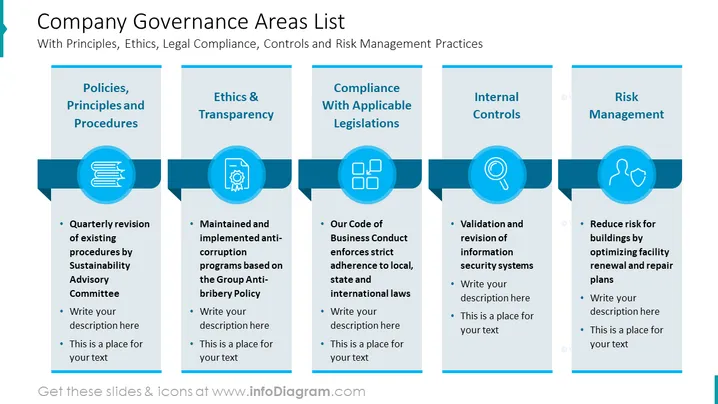
The slide outlines five critical areas of company governance, including policies, principles, procedures, ethics, transparency, compliance with legislation, internal controls, and risk management. Each area has two points below it which provide a brief explanation or placeholder text for a more detailed description. "Policies, Principles, and Procedures" focuses on regular revisions by a sustainability advisory committee. "Ethics & Transparency" emphasizes maintaining and implementing anti-corruption programs. "Compliance With Applicable Legislations" details strict adherence to laws. "Internal Controls" includes validation and revision of information security systems. "Risk Management" suggests reducing risk via optimizing facility plans.
Graphical Look
- The slide background is white.
- The title "Company Governance Areas List" is at the top with a subtitle beneath it.
- There are five main content blocks, each with a header in teal and white text.
- Every block has a circular icon above its header, with a corresponding blue color scheme and related symbol.
- Each block contains bulleted points for detailed text underneath the header.
- Horizontal blue banners connect the circular icons across the slide, visually grouping the blocks.
- The icons include a stack of books, a badge with a checkmark, a series of squares, a magnifying glass over a document, and a broken link or chain to symbolize each governance area.
The slide uses a clean and professional design with a consistent color scheme of blue, teal, and white, creating a cohesive visual flow. Icons visually represent each topic, aiding in quick comprehension.
Use Cases
- To introduce the components of governance in corporate training on compliance.
- As an agenda slide for a meeting discussing updates to company governance policies.
- In a board of directors' presentation summarizing governance practices.
- While proposing enhancements to governance strategies in a stakeholder meeting.
How to Edit
How to edit text & colors

How to expand / shorten diagram

How to Replace Icons in infoDiagram PPT


