Reviews
Ihre Grafiken verleihen meinen Präsentationen eine nette Note, und ich habe sie kürzlich für eines meiner All-Hands-Meetings verwendet. Ihre Toolbox verleiht meinen Folien Professionalität, anstatt Standard-Clipart zu verwenden.
Ich brauchte einen neuen Blick auf einige meiner Folien. Ich habe versucht, einen Weg zu finden, einen Pinselschlag-Effekt zu erzielen, um zu unterstreichen, hervorzuheben, Farbe hinzuzufügen, und die handgeschriebenen Markierungen waren genau das Richtige. Sehr einfach zu bedienen, leicht in der Größe zu ändern, die Farbe zu ändern. Es war eine erschwingliche, perfekte Lösung und ich empfehle sie gerne weiter.
Die klare, saubere Optik der Grafiken und die Tatsache, dass ich die Farben leicht bearbeiten und an die Vorlage anpassen konnte, war mein Hauptgrund für den Kauf.
Description
Creative Problem-Solving Process
Slide Content
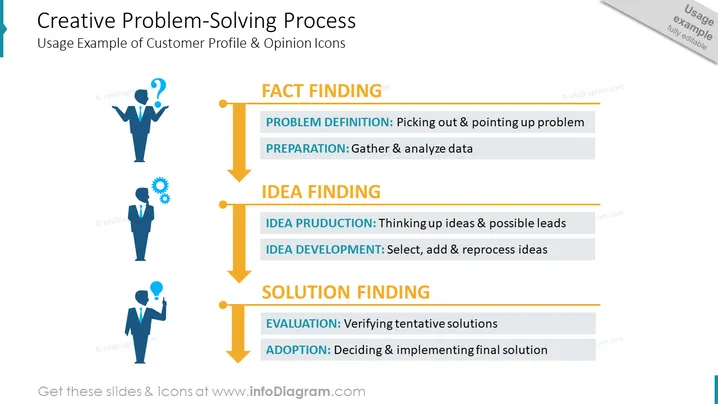
This PowerPoint slide outlines a structured approach to problem-solving, featuring the "Creative Problem-Solving Process." It begins with the "FACT FINDING" stage, which includes "PROBLEM DEFINITION" (understanding and highlighting the issue) and "PREPARATION" (data collection and analysis). The next phase is "IDEA FINDING," comprising "IDEA PRODUCTION" (generating ideas and leads) and "IDEA DEVELOPMENT" (refinement and enhancement of ideas). The final steps are "SOLUTION FINDING," entailing "EVALUATION" (testing and assessing solutions) and "ADOPTION" (the decision-making and application of solutions).
Graphical Look
- The slide title uses a bold, large font centered near the top of the slide.
- Three distinct sections are highlighted vertically: "FACT FINDING," "IDEA FINDING," and "SOLUTION FINDING," each with a contrasting background color.
- Each section contains sub-points outlined with bullet points and brief explanatory texts.
- A large, orange arrow runs vertically along the center, symbolizing the flow of the process with markers for each section and sub-point.
- Silhouette icons of a person are placed on the left side, each representing different stages of the process with a question mark, gears, and lightbulb graphics.
- Background is plain with subtle design elements, allowing for clear text and graphic visibility.
The overall look of the slide is clean and professional, with a logical flow depicted by the central arrow. The use of icons and color-coding effectively highlights different stages of the creative problem-solving process.
Use Cases
- To introduce a team or workshop participants to a structured creative problem-solving methodology.
- As part of a training module or seminar on innovation, emphasizing the steps from identifying problems to implementing solutions.
- In a project kick-off meeting to set expectations and approaches for ideation and development.
- During a strategic planning session, outlining the process for tackling challenges and developing new initiatives.
How to Edit
How to edit text & colors

How to expand / shorten diagram

How to Replace Icons in infoDiagram PPT


