Reviews
Your graphics add a nice touch to my presentations and I recently used them for one of my all-hands meetings. Your toolbox adds professionalism to my slides. Instead of using standard clipart.
I needed a fresh look at some of my slides. I've tried to find a way to create a paintbrush effect, to underline, accentuate, add some color and the handwritten markers were just the things. Very easy to use, easy to size, change the color. It was an affordable, perfect solution and I'm happy to recommend it.
The crisp, clean look of the graphics, and the fact that it allowed me to easily edit and change the colors to match the template was my main reason for purchasing them.
Description
DevOps Toolchain Loop – Release summary description
Slide Content
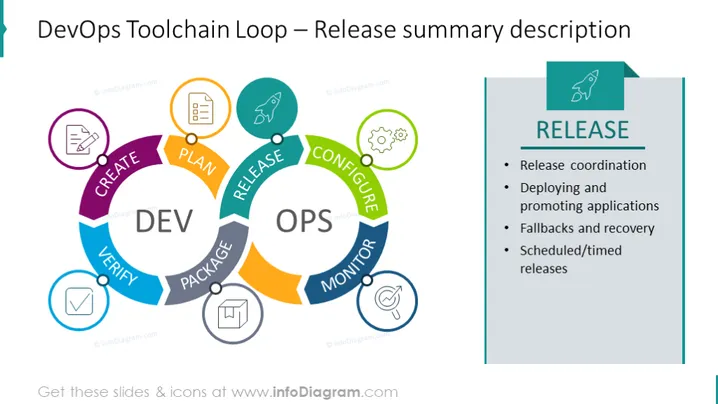
The slide introduces the 'Release' phase of the DevOps Toolchain Loop. The key activities associated with this phase include 'Release coordination', which is organizing the different parts of the release process; 'Deploying and promoting applications', which entails moving applications from development to production environments; 'Fallbacks and recovery', which involves planning for potential failure and how to restore service; and 'Scheduled/timed releases', which refers to planning releases for specific times.
Graphical Look
- An infinite loop diagram with arrows showing continuity, represents the DevOps lifecycle.
- Colored segments labeled "PLAN," "CREATE," "VERIFY," "PACKAGE," "RELEASE," "CONFIGURE," "MONITOR," and back to "PLAN," each segment with an icon.
- The "RELEASE" segment is highlighted with a contrasting color and connected to a textbox.
- Icons: Edit document for "PLAN," coding brackets for "CREATE," a checkmark for "VERIFY," package for "PACKAGE," rocket for "RELEASE," settings gears for "CONFIGURE," and a magnifying glass for "MONITOR."
- A textbox titled "RELEASE" with a bulleted list of the phase's attributes to the right of the diagram.
- The slide's background is white, the graphics and text are colorful and clear.
The slide is visually balanced with a focus on the 'Release' phase of the DevOps loop; the right side provides detailed descriptions, which complements the diagrammatic representation on the left. The color-coded segments facilitate quick comprehension of the lifecycle.
Use Cases
- To illustrate the DevOps cycle in a training or educational setting, making it easier for learners to understand the workflow.
- In a business meeting, when proposing improvements to the release management process within an organization.
- During a software development team briefing, to clarify roles and responsibilities for a product release.
- When reviewing a project's progress with stakeholders, to demonstrate where the project is within the continuous development loop and what comes next in the cycle.
How to Edit
How to edit text & colors

How to expand / shorten diagram

How to Replace Icons in infoDiagram PPT


