

Your graphics add a nice touch to my presentations and I recently used them for one of my all-hands meetings. Your toolbox adds professionalism to my slides. Instead of using standard clipart.
Claude Jones, Director of Engineer, @Walmartlabs, USA

Your graphics add a nice touch to my presentations and I recently used them for one of my all-hands meetings. Your toolbox adds professionalism to my slides. Instead of using standard clipart.
Claude Jones, Director of Engineer, @Walmartlabs, USA
I needed a fresh look at some of my slides. I've tried to find a way to create a paintbrush effect, to underline, accentuate, add some color and the handwritten markers were just the things. Very easy to use, easy to size, change the color. It was an affordable, perfect solution and I'm happy to recommend it.
Anonymous, US
The crisp, clean look of the graphics, and the fact that it allowed me to easily edit and change the colors to match the template was my main reason for purchasing them.
Brandie Jenkins, E-learning Developer, USA
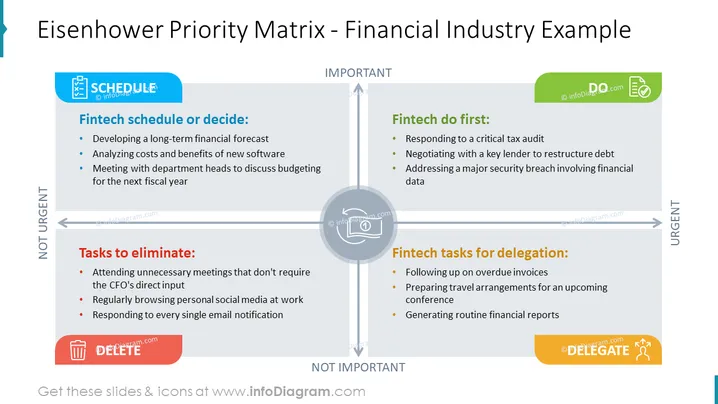
The slide displays the Eisenhower Priority Matrix tailored for the financial industry, dividing tasks into four quadrants. "Fintech schedule or decide" consists of strategic planning tasks like long-term financial forecasting and new software cost-benefit analysis; these are important but not urgent. "Fintech do first" includes immediate and critical tasks such as tax audits and negotiating debt, indicating their urgency and importance. "Tasks to eliminate" suggests to avoid non-essential activities like unnecessary meetings, which are neither urgent nor important. "Fintech tasks for delegation" covers operational work like following up invoices, meant to be delegated as they are not important yet require urgent attention.
The slide has a clean and professional look, employing a color-coded system to visually separate and categorize information. The matrix is well-balanced with equal spacing between quadrants and a clear grid layout, making the content easy to follow.



