Reviews
Ihre Grafiken verleihen meinen Präsentationen eine nette Note, und ich habe sie kürzlich für eines meiner All-Hands-Meetings verwendet. Ihre Toolbox verleiht meinen Folien Professionalität, anstatt Standard-Clipart zu verwenden.
Ich brauchte einen neuen Blick auf einige meiner Folien. Ich habe versucht, einen Weg zu finden, einen Pinselschlag-Effekt zu erzielen, um zu unterstreichen, hervorzuheben, Farbe hinzuzufügen, und die handgeschriebenen Markierungen waren genau das Richtige. Sehr einfach zu bedienen, leicht in der Größe zu ändern, die Farbe zu ändern. Es war eine erschwingliche, perfekte Lösung und ich empfehle sie gerne weiter.
Die klare, saubere Optik der Grafiken und die Tatsache, dass ich die Farben leicht bearbeiten und an die Vorlage anpassen konnte, war mein Hauptgrund für den Kauf.
Description
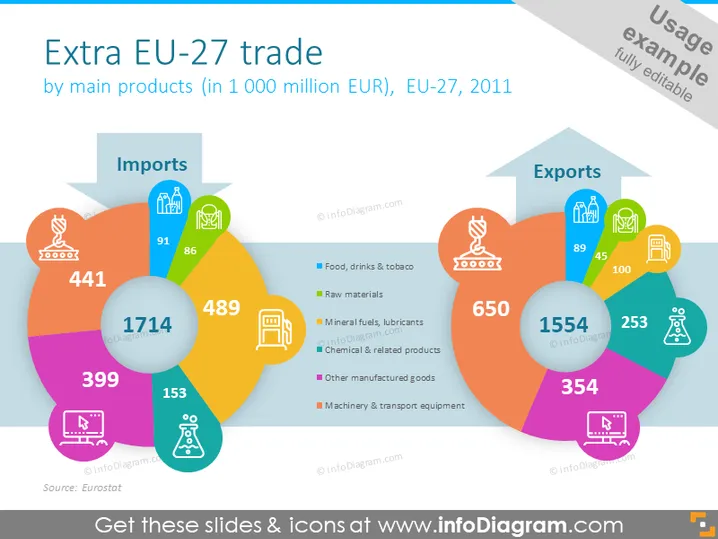
Extra EU-27 trade
Slide Content
The slide presents "Extra EU-27 trade by main products (in 1 000 million EUR), EU-27, 2011". It features two large, overlapping circle diagrams representing imports on the left and exports on the right. Each segment of the circles is color-coded to match with specific categories such as Food, drinks & tobacco; Raw materials; Mineral fuels, lubricants; Chemicals & related products; Other manufactured goods; Machinery & transport equipment. The sizes of the segments correspond to the trade volume of each category. Notably, 'Machinery & transport equipment' and 'Chemical & related products' have the largest segments indicating their significance in trade.
Graphical Look
- The slide has a large white background with a prominent title in dark text at the top.
- There are two main circular diagrams, one labeled "Imports" and the other "Exports," both encompassing different colored segments to represent trade categories.
- Each segment has a unique icon and a number denoting the value of trade in that category.
- The icons are simple line drawings, each enclosed within a subtle, colored hexagonal outline related to the segment color.
- Color coding: ranges from purple, blue, teal, green, orange to pink, aiding in visually distinguishing the categories.
- At the bottom of the slide, there's a legend explaining the colors corresponding to the product categories.
- A small source attribution text "Source: Eurostat" is positioned at the bottom left.
The slide is vibrant, with colorful segments facilitating an easy understanding of the distribution of trade interest areas. The icons and their associated numbers are clear and contribute to the overall readability of the data presented.
Use Cases
- Presenting trade statistics in an international economics or business conference.
- Discussing trade policies and their effects on different sectors with policymakers or stakeholders.
- Illustrating a company's import-export data during annual reports or stakeholder meetings.
- Educational settings to provide visual aid in understanding trade balances and product category significance within the EU market.
How to Edit
How to edit text & colors

How to expand / shorten diagram

How to Replace Icons in infoDiagram PPT


