Reviews
Sus gráficos añaden un toque agradable a mis presentaciones y recientemente los usé para una de mis reuniones generales. Su conjunto de herramientas añade profesionalismo a mis diapositivas. En lugar de usar imágenes prediseñadas estándar.
Necesitaba un aspecto fresco para algunas de mis diapositivas. Había intentado encontrar una forma de crear un efecto de pincel, de subrayar, acentuar, añadir algo de color y los marcadores escritos a mano fueron justo lo que necesitaba. Muy fácil de usar, fácil de ajustar el tamaño, cambiar el color. Fue una solución asequible y perfecta, y estoy feliz de recomendarla.
El aspecto nítido y limpio de los gráficos, y el hecho de que me permitiera editar y cambiar fácilmente los colores para que coincidieran con la plantilla fue mi principal razón para comprarlos.
Description
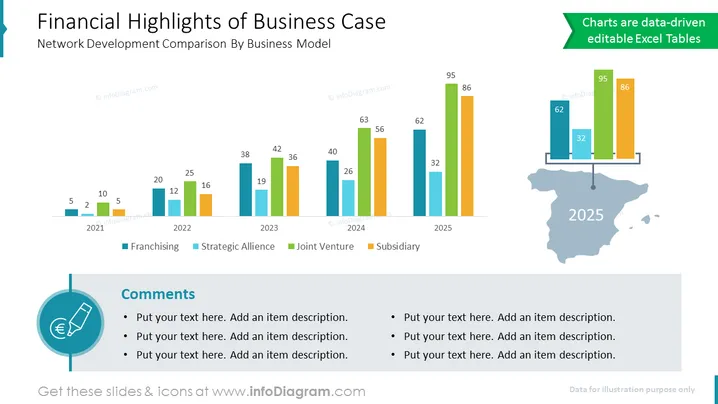
Financial Highlights of Business Case
Slide Content: Network Development Comparison By Business Model
- Charts are data-driven editable Excel Tables (The charts on the slide are created using Excel tables, which makes them easy to update with new data.)
- Franchising (This row shows the financial performance of the franchising business model.)
- Strategic Alliance (This row shows the financial performance of the strategic alliance business model.)
- Joint Venture (This row shows the financial performance of the joint venture business model.)
- Subsidiary (This row shows the financial performance of the subsidiary business model.)
- Comments (This section of the slide is for adding comments or notes about the financial data.)
Graphical Look:
The slide has a simple and professional design. The background is white, and the text is black. The charts are blue and green. The icons are a dark gray.

Where to Use Financial Highlights Template:
- To present a business case to investors or other stakeholders. This type of slide can be used to show the potential financial benefits of a proposed project or investment.
- To compare different business models or investment opportunities. This type of slide can be used to show the relative strengths and weaknesses of different options, based on financial factors.
- To track the financial performance of a project or investment over time. This type of slide can be used to show how a project or investment is progressing and to identify any areas of concern.
- To communicate financial results to internal stakeholders. This type of slide can be used to keep employees and management informed of the company's financial performance.
How to Edit
How to edit text & colors

How to expand / shorten diagram

How to Replace Icons in infoDiagram PPT

