Reviews
Your graphics add a nice touch to my presentations and I recently used them for one of my all-hands meetings. Your toolbox adds professionalism to my slides. Instead of using standard clipart.
I needed a fresh look at some of my slides. I've tried to find a way to create a paintbrush effect, to underline, accentuate, add some color and the handwritten markers were just the things. Very easy to use, easy to size, change the color. It was an affordable, perfect solution and I'm happy to recommend it.
The crisp, clean look of the graphics, and the fact that it allowed me to easily edit and change the colors to match the template was my main reason for purchasing them.
Description
Financial infographics matrix
Slide Content
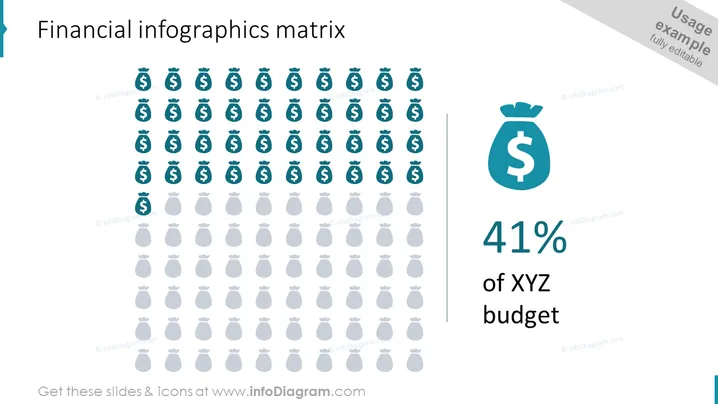
The slide is a visual representation of financial data, specifically illustrating a portion of a budget. It features an array of icons depicting money bags with one highlighted area showing that 41% of the XYZ budget is being considered. The icons are arranged in rows and columns, creating a matrix-like structure. Each money bag icon likely represents a portion of the budget, and the collective visage appears to be a quantifiable analysis of financial allocation.
Graphical Look
- The slide background is white, providing a clean and neutral canvas for the content.
- A money bag icon is repeated across the slide in a grid pattern, with the majority in a lighter shade of gray and a smaller section in a vivid teal color.
- A large percentage value "41%" is prominently displayed to the right side of the grid, in a bold, dark grey font.
- Next to the percentage, there's a descriptor "of XYZ budget" in a smaller, lighter font, indicating what the percentage represents.
- To the right of the grid, there's a slightly larger teal money bag icon corresponding with the colored icons within the grid.
- The slide title "Financial infographics matrix" is situated at the top in a large, bold font, setting the topic for the slide.
- There are subtle light grey lines dividing the header from the main content and demarcating the right section with the percentage breakdown.
The slide has a professional and straightforward design, using a limited color palette to highlight key elements. The use of money bag icons in a matrix format effectively visualizes distribution or allocation of funds within a budget in a clear and engaging manner.
Use Cases
- Displaying financial data such as budget allocations or expense distributions during a corporate finance meeting or presentation.
- Visualizing company spending or investment percentages in shareholder or board meetings to provide clear insights into financial strategies.
- Enhancing educational materials or workshops on budgeting, financing, or economics, making the information more accessible and engaging for students or participants.
- Using in financial reports or proposals to graphically represent how funds are being utilized in different departments or projects.
How to Edit
How to edit text & colors

How to expand / shorten diagram

How to Replace Icons in infoDiagram PPT


