Reviews
Your graphics add a nice touch to my presentations and I recently used them for one of my all-hands meetings. Your toolbox adds professionalism to my slides. Instead of using standard clipart.
I needed a fresh look at some of my slides. I've tried to find a way to create a paintbrush effect, to underline, accentuate, add some color and the handwritten markers were just the things. Very easy to use, easy to size, change the color. It was an affordable, perfect solution and I'm happy to recommend it.
The crisp, clean look of the graphics, and the fact that it allowed me to easily edit and change the colors to match the template was my main reason for purchasing them.
Description
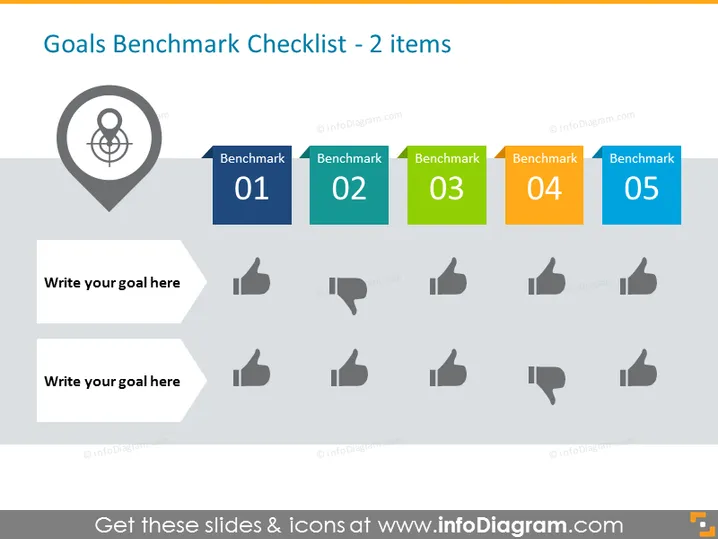
Goals Benchmark Checklist - 2 items
Slide Content
The PowerPoint slide is titled "Goals Benchmark Checklist - 2 items," suggesting a framework for comparing goals against benchmarks. It presents a series of five benchmarks, each labeled "Benchmark" followed by a number (01 through 05). Each benchmark has an associated thumbs up or thumbs down icon, indicating a visual cue for success or failure against the benchmark. Two text boxes are provided for writing specific goals, paired with a thumbs up or down icon to presumably mark the goal's status in relation to the benchmarks.
Graphical Look
- The slide has a clean and professional design with a light background.
- A large title is situated at the top in dark text.
- Five rectangular color blocks are aligned horizontally across the slide, each with a different color and labeled "Benchmark 01" to "Benchmark 05."
- A thumbs up or down icon in shades of gray accompanies each benchmark.
- Two text boxes are placed to the left, staggered and designed with a drop shadow effect, intended for goal input.
- Visually, icons and text boxes are designed to create a balance of elements.
The slide features a minimalist design, directing focus to the benchmarks and evaluation status represented by the icons. It exudes an organized and business-like aesthetic, perfect for formal presentations.
Use Cases
- Setting expectations and assessing performance during team meetings or reviews.
- Visually tracking project milestones and deliverables in a management presentation.
- Demonstrating company performance against set KPIs during stakeholder meetings.
- Engaging in strategic planning sessions where visualization of goal status is beneficial.
How to Edit
How to edit text & colors

How to expand / shorten diagram

How to Replace Icons in infoDiagram PPT


