Reviews
Ihre Grafiken verleihen meinen Präsentationen eine nette Note, und ich habe sie kürzlich für eines meiner All-Hands-Meetings verwendet. Ihre Toolbox verleiht meinen Folien Professionalität, anstatt Standard-Clipart zu verwenden.
Ich brauchte einen neuen Blick auf einige meiner Folien. Ich habe versucht, einen Weg zu finden, einen Pinselschlag-Effekt zu erzielen, um zu unterstreichen, hervorzuheben, Farbe hinzuzufügen, und die handgeschriebenen Markierungen waren genau das Richtige. Sehr einfach zu bedienen, leicht in der Größe zu ändern, die Farbe zu ändern. Es war eine erschwingliche, perfekte Lösung und ich empfehle sie gerne weiter.
Die klare, saubere Optik der Grafiken und die Tatsache, dass ich die Farben leicht bearbeiten und an die Vorlage anpassen konnte, war mein Hauptgrund für den Kauf.
Description
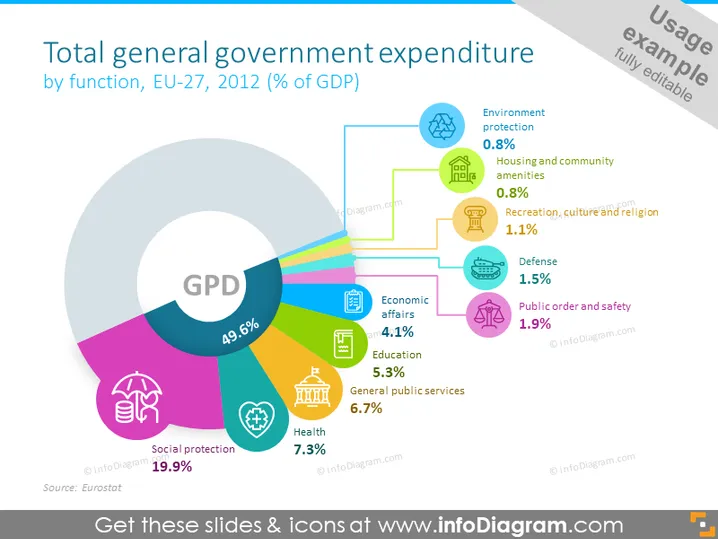
Total general government expenditure by function, EU-27, 2012 (% of GDP)
Slide Content
The slide shows a pie chart detailing the general government expenditure by function for EU-27 in the year 2012 as a percentage of GDP. The largest segment is 'Social protection' at 19.9%, followed by 'General public services' (6.7%), 'Health' (7.3%), and 'Education' (5.3%). Smaller portions include 'Economic affairs' (4.1%), 'Public order and safety' (1.9%), 'Defense' (1.5%), 'Recreation, culture and religion' (1.1%), 'Housing and community amenities' (0.8%), and 'Environment protection' (0.8%). Social protection represents expenses like pensions and unemployment benefits, while general public services cover administrative costs of governance.
Graphical Look
- The slide background is light blue with a watermark-style element in the top right corner that isn’t part of the slide’s informational content.
- A large doughnut chart dominates the center of the slide, labeled with the acronym "GDP" in bold white letters, and is sectioned into colorful parts representing different government expenditure categories.
- Each category in the chart is associated with a percentage value and an icon that symbolizes the category; for instance, a house for 'Housing and community amenities.'
- Outside of the doughnut chart, there are labels aligned with each section, detailing the name and percentage of expenditure, color-coordinated with the chart itself.
- In the corners, small text provides the source of the data (Eurostat) and copyright information.
The overall look of the slide is modern and clean, with colorful graphics that are easy to interpret. The icons and labels make the information accessible and visually engaging.
Use Cases
- Presenting government budget breakdowns in economic or public administration courses.
- Discussing public expenditure in policy analysis or governance workshops.
- Illustrating government spending in public sector reports or presentations.
- Comparing expenditure patterns across different years or countries in international conferences or seminars.
How to Edit
How to edit text & colors

How to expand / shorten diagram

How to Replace Icons in infoDiagram PPT


