

Your graphics add a nice touch to my presentations and I recently used them for one of my all-hands meetings. Your toolbox adds professionalism to my slides. Instead of using standard clipart.
Claude Jones, Director of Engineer, @Walmartlabs, USA

Your graphics add a nice touch to my presentations and I recently used them for one of my all-hands meetings. Your toolbox adds professionalism to my slides. Instead of using standard clipart.
Claude Jones, Director of Engineer, @Walmartlabs, USA
I needed a fresh look at some of my slides. I've tried to find a way to create a paintbrush effect, to underline, accentuate, add some color and the handwritten markers were just the things. Very easy to use, easy to size, change the color. It was an affordable, perfect solution and I'm happy to recommend it.
Anonymous, US
The crisp, clean look of the graphics, and the fact that it allowed me to easily edit and change the colors to match the template was my main reason for purchasing them.
Brandie Jenkins, E-learning Developer, USA
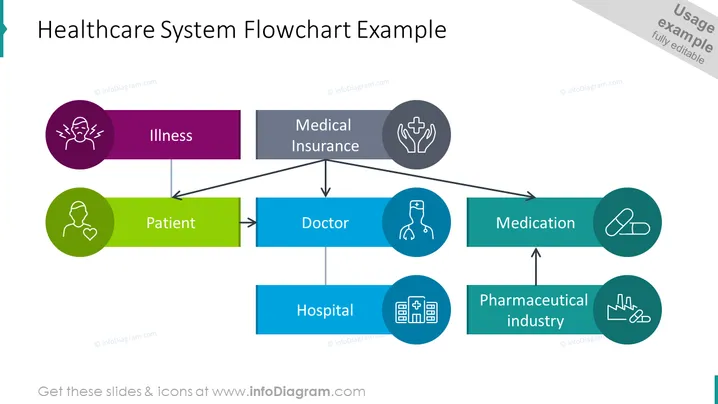
The PowerPoint slide presents a "Healthcare System Flowchart Example" illustrating connections between different elements of a healthcare system. The sequential steps begin with "Illness," followed by "Patient," who then goes to see a "Doctor." Arrows indicate flow to "Hospital" or receiving "Medication," which is connected back to the "Pharmaceutical industry." Each stage is represented by a colored shape and associated icon, illustrating the step's role in the healthcare journey. "Illness" refers to the health condition triggering the need for care, "Patient" is the individual seeking treatment, "Doctor" is the healthcare professional providing medical advice, "Hospital" represents the healthcare institution providing treatment, "Medication" implies the prescribed drugs for treatment, and the "Pharmaceutical industry" denotes the sector responsible for developing and supplying medications.
The slide's overall look is sleek and modern, with a clear and easy-to-follow visual representation of the healthcare system workflow. The color-coding and icons are used effectively to differentiate each step in the process.



