Reviews
Ihre Grafiken verleihen meinen Präsentationen eine nette Note, und ich habe sie kürzlich für eines meiner All-Hands-Meetings verwendet. Ihre Toolbox verleiht meinen Folien Professionalität, anstatt Standard-Clipart zu verwenden.
Ich brauchte einen neuen Blick auf einige meiner Folien. Ich habe versucht, einen Weg zu finden, einen Pinselschlag-Effekt zu erzielen, um zu unterstreichen, hervorzuheben, Farbe hinzuzufügen, und die handgeschriebenen Markierungen waren genau das Richtige. Sehr einfach zu bedienen, leicht in der Größe zu ändern, die Farbe zu ändern. Es war eine erschwingliche, perfekte Lösung und ich empfehle sie gerne weiter.
Die klare, saubere Optik der Grafiken und die Tatsache, dass ich die Farben leicht bearbeiten und an die Vorlage anpassen konnte, war mein Hauptgrund für den Kauf.
Description
Honeycomb Diagram of 4 CSR Elements
Slide Content
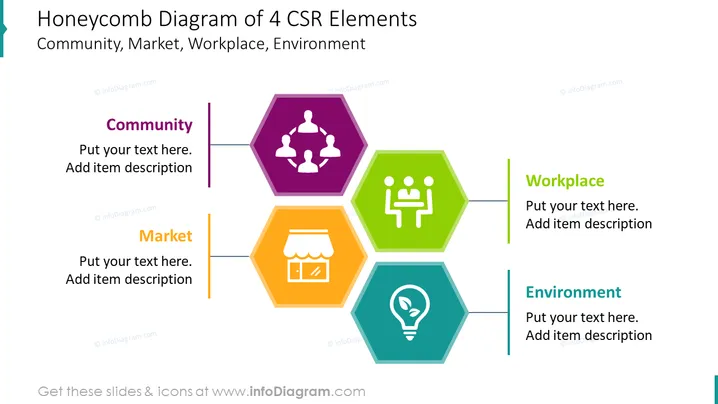
The slide presents a honeycomb diagram illustrating four key elements of Corporate Social Responsibility (CSR), each represented by a distinct colored hexagon with an icon and labeled as Community, Market, Workplace, and Environment. Community refers to the company's interactions and relationships with people it affects. Market indicates the company's operations within the economic systems. Workplace pertains to its internal practices affecting employees. Environment denotes the company's impact on ecological systems.
Graphical Look
- The slide has a white background with four large hexagon shapes arranged in a honeycomb pattern.
- Each hexagon is a different color: purple for Community, orange for Market, green for Workplace, and blue for Environment.
- Inside each hexagon, there is a white icon symbolizing the respective element: a group of figures for Community, storefront for Market, presentation for Workplace, and lightbulb with a leaf for Environment.
- Next to each hexagon, there is a colored vertical bar matching the hexagon color, with accompanying text placeholders.
- The overall design of the slide is clean, with a clear segregation of content and ample space for custom text.
The design is modern and professional. The use of vibrant colors and simple icons provides an easy way to recognize and differentiate among the elements.
Use Cases
- To introduce the components of a CSR program during a corporate presentation.
- As part of an educational seminar explaining the different aspects of Corporate Social Responsibility.
- In a business strategy meeting to align the company's goals with its CSR initiatives.
- For reporting on CSR activities and progress to stakeholders or investors.
How to Edit
How to edit text & colors

How to expand / shorten diagram

How to Replace Icons in infoDiagram PPT


