Reviews
Ihre Grafiken verleihen meinen Präsentationen eine nette Note, und ich habe sie kürzlich für eines meiner All-Hands-Meetings verwendet. Ihre Toolbox verleiht meinen Folien Professionalität, anstatt Standard-Clipart zu verwenden.
Ich brauchte einen neuen Blick auf einige meiner Folien. Ich habe versucht, einen Weg zu finden, einen Pinselschlag-Effekt zu erzielen, um zu unterstreichen, hervorzuheben, Farbe hinzuzufügen, und die handgeschriebenen Markierungen waren genau das Richtige. Sehr einfach zu bedienen, leicht in der Größe zu ändern, die Farbe zu ändern. Es war eine erschwingliche, perfekte Lösung und ich empfehle sie gerne weiter.
Die klare, saubere Optik der Grafiken und die Tatsache, dass ich die Farben leicht bearbeiten und an die Vorlage anpassen konnte, war mein Hauptgrund für den Kauf.
Description
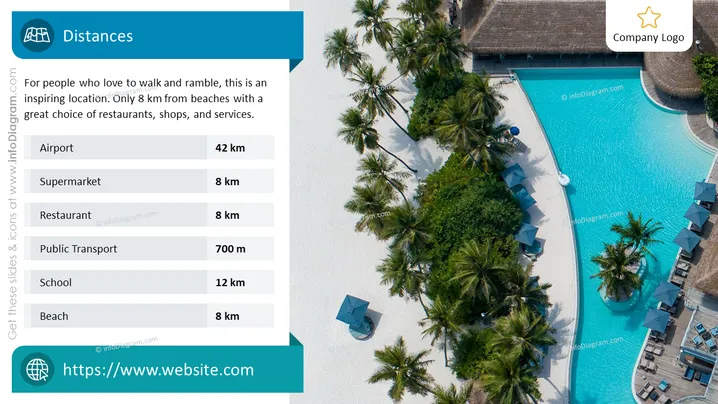
Distances
Slide Content
The slide titled "Distances" focuses on the proximity of various amenities and services to a location that is favorable for individuals who enjoy walking and exploring. It highlights distances to an airport (42 km), supermarket (8 km), restaurant (8 km), public transport (700 m), a school (12 km), and a beach (8 km), portraying the location as comfortable and convenient due to its closeness to these essential places.
Graphical Look
- The slide background features a high-resolution aerial photograph of a tropical resort with lush greenery, a pool, and beachside umbrellas.
- A semi-transparent dark blue overlay on the left side contains white text and icons.
- There are seven lines of text, each paired with a corresponding icon representing different facilities (airport, supermarket, restaurant, public transport, school, beach).
- Each facility has a different icon that is thematically tied to its function—a plane for airport, a shopping cart for supermarket, a fork and knife for restaurant, etc.
- The distance to each facility is listed in kilometers, with varying distances from 700 meters to 42 kilometers.
- The website's URL is displayed at the bottom, also within a dark blue rectangle with a globe icon to its left.
- In the top right corner, a placeholder with a golden star is present, presumably for a company logo.
The slide has a very professional look, using icons and concise text to convey information efficiently. The photographic background adds an inviting, aspirational quality to the presentation.
Use Cases
- Presenting the location advantages of a real estate property or holiday resort to potential investors or customers.
- Showcasing accessibility features of a tourist destination in travel agencies or tourism board presentations.
- Providing an overview of logistical considerations for a business considering the setup of new operations or offices.
- Offering contextual information in an urban planning or development meeting to highlight connectivity and infrastructure.
How to Edit
How to edit text & colors

How to expand / shorten diagram

How to Replace Icons in infoDiagram PPT


