Reviews
Your graphics add a nice touch to my presentations and I recently used them for one of my all-hands meetings. Your toolbox adds professionalism to my slides. Instead of using standard clipart.
I needed a fresh look at some of my slides. I've tried to find a way to create a paintbrush effect, to underline, accentuate, add some color and the handwritten markers were just the things. Very easy to use, easy to size, change the color. It was an affordable, perfect solution and I'm happy to recommend it.
The crisp, clean look of the graphics, and the fact that it allowed me to easily edit and change the colors to match the template was my main reason for purchasing them.
Description
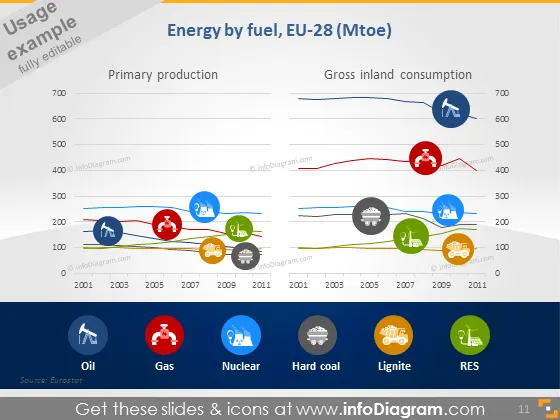
Energy by fuel, EU-28 (Mtoe)
Slide Content
The slide presents data on energy by fuel type in the EU-28, differentiated between Primary production and Gross inland consumption. It displays a timeline from 2001 to 2011, showing trends for Oil, Gas, Nuclear, Hard coal, Lignite, and RES (Renewable Energy Sources). Each fuel type is represented by an icon and a color-coded line showing the production and consumption levels over time, which allows for a visual comparison of the fuel types and their change throughout the years.
Graphical Look
- Two main charts titled "Primary production" and "Gross inland consumption".
- Color-coded line graphs used to represent data over time for each energy source.
- Icon representations for each type of fuel at the bottom: Oil (oil rig), Gas (gas flame), Nuclear (nuclear symbol), Hard coal (coal), Lignite (brown lump), RES (a leaf for renewables).
- Colored circular icons with white silhouettes corresponding to each fuel type placed along the line graphs indicating quantities in specific years.
- A horizontal legend below the graphs displaying the icons and names of each fuel type.
- The slide background is blue with a slight gradient and a darker blue at the bottom.
- The data points along the line graphs are highlighted with larger icons corresponding to the legend's smaller icons.
The slide is designed with a clear and professional look, using icons and color coding to effectively communicate complex data. The dual-chart layout aids in comparison between production and consumption trends for different fuel types.
Use Cases
- Presenting energy trends in a business meeting or economics class to discuss the changes in energy production and consumption over a decade.
- Using in an energy industry conference to highlight the shift in energy sources and discuss future energy policy direction.
- Showing in a government or policy-making presentation to support discussions on renewable energy development and fossil fuel dependency.
- Incorporating into environmental impact reports to visualize changes in the energy mix and their potential impact on sustainability goals.
How to Edit
How to edit text & colors

How to expand / shorten diagram

How to Replace Icons in infoDiagram PPT


