Reviews
Your graphics add a nice touch to my presentations and I recently used them for one of my all-hands meetings. Your toolbox adds professionalism to my slides. Instead of using standard clipart.
I needed a fresh look at some of my slides. I've tried to find a way to create a paintbrush effect, to underline, accentuate, add some color and the handwritten markers were just the things. Very easy to use, easy to size, change the color. It was an affordable, perfect solution and I'm happy to recommend it.
The crisp, clean look of the graphics, and the fact that it allowed me to easily edit and change the colors to match the template was my main reason for purchasing them.
Description
Using 3D isometric supply chain graphics: PowerPoint editable vector icons - modify color & style
Slide Content
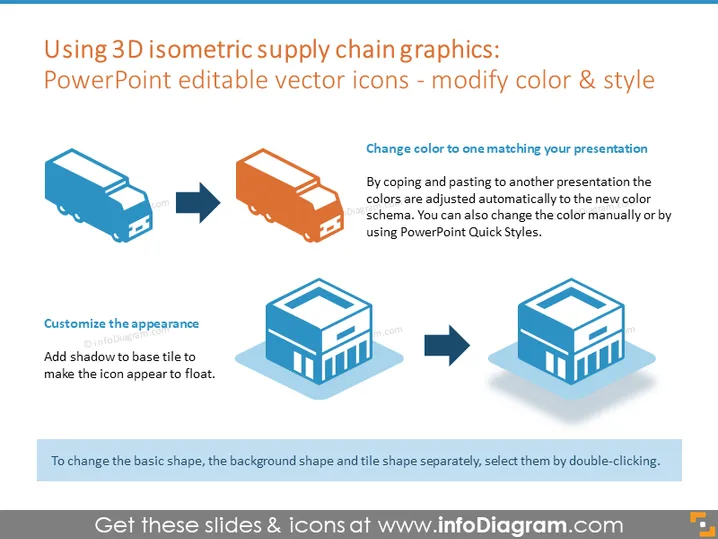
The PowerPoint slide is focused on demonstrating how 3D isometric supply chain graphics, specifically vector icons, can be edited to match the color and style of a presentation. It explains that colors can be adjusted automatically when the icons are copied and pasted into a new presentation with a different colors scheme, or colors can be manually changed using PowerPoint's Quick Styles. The slide also indicates that the appearance can be customized by adding a shadow to the base tile, giving the icon a floating effect.
Graphical Look
- Two pairs of isometric graphics, each including a before-after transformation, imply user-editable features.
- Arrows connect the original icon with its edited version to show the potential changes.
- Color changes are illustrated with a truck icon shifting from blue to orange.
- A warehouse building icon is shown with and without a shadow to depict the customization of appearance.
- Text boxes are provided with explanations related to the visual changes on the icons.
- A light blue rectangle serves as a background to the slide title, creating contrast.
- Each set of icons is labeled with tips on how to achieve the demonstrated changes, using a clear, sans-serif font.
The slide has a clean, professional design using isometric graphics to visually communicate the customizable nature of vector icons. The design is simple and straightforward, making effective use of before-and-after imagery to demonstrate editing capabilities.
Use Cases
- Explaining how to customize presentation graphics to match company branding.
- Training individuals on how to use advanced features in PowerPoint to enhance their presentations.
- Showcasing the flexibility of design tools within presentation software during a design-focused workshop.
- Illustrating the before and after effects of design changes in marketing materials for a visual communication course.
How to Edit
How to edit text & colors

How to expand / shorten diagram

How to Replace Icons in infoDiagram PPT


