Reviews
Deine Folien sind meine 'geheime Zutat', wenn es darum geht, meine Ideen Kunden zu visualisieren. Ich spare so viel Zeit.
Ihre Folien führen oft zu guten Kommentaren und Ideen meines Teams, die die endgültigen Folien verbessern.
Description
January – with place for notes
Slide Content
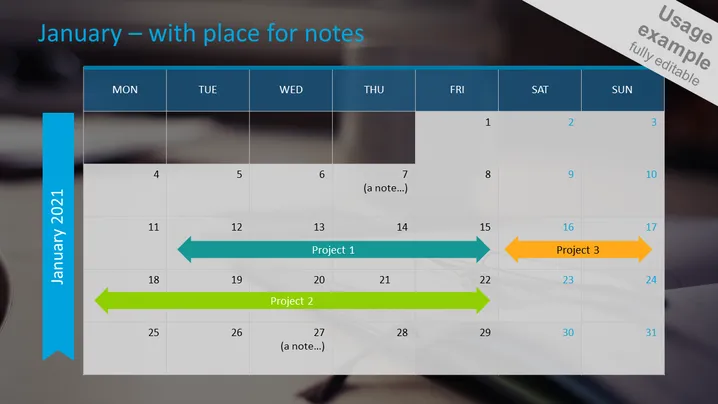
The PowerPoint slide presents a monthly calendar for January 2021, designed for project tracking and noting important events. It provides a visual perspective of time allocated for 'Project 1', 'Project 2', and 'Project 3', illustrating the projects' durations and overlaps. Each project is represented by a colored arrow, with 'Project 1' starting mid-month and 'Project 3' spanning a short period. Notes can be added under specific dates, indicating potential meetings, milestones, or reminders.
Graphical Look
- The slide background is a faded image of what appears to be an office environment, adding a professional context to the presentation.
- A large, bold, vertical blue banner on the left side displays "January 2021," serving as both a decorative element and the calendar's title.
- A grid layout represents days of the week across the top in dark blue, with individual dates arranged below in a more subdued gray-white table.
- Colored arrows acting as timelines indicate the duration of projects: teal arrow for "Project 1", green arrow for "Project 2", and an orange arrow for "Project 3".
- Placeholder text for notes is placed within the table on the 7th and 26th, demonstrating where additional text can be entered.
- The overall aesthetic is clean, modern, and business-like, with a high level of readability and clear emphasis on project duration through the use of brightly colored arrows. The slide has a polished and professional design effectively combining text, color, and simple graphics to facilitate project management and scheduling discussions.
Use Cases
- Presenting project timelines and milestones in a business meeting to give a clear overview of the month's activities.
- Planning and coordinating team activities in a visual format during strategy sessions to understand resource allocation and availability.
- Using as a template in monthly review meetings where project progress is discussed and future tasks are planned.
- Embedding in client presentations to showcase the planned project timelines and set expectations regarding delivery dates and key project phases.
How to Edit
How to edit text & colors

How to expand / shorten diagram

How to Replace Icons in infoDiagram PPT


