Reviews
Sus gráficos añaden un toque agradable a mis presentaciones y recientemente los usé para una de mis reuniones generales. Su conjunto de herramientas añade profesionalismo a mis diapositivas. En lugar de usar imágenes prediseñadas estándar.
Necesitaba un aspecto fresco para algunas de mis diapositivas. Había intentado encontrar una forma de crear un efecto de pincel, de subrayar, acentuar, añadir algo de color y los marcadores escritos a mano fueron justo lo que necesitaba. Muy fácil de usar, fácil de ajustar el tamaño, cambiar el color. Fue una solución asequible y perfecta, y estoy feliz de recomendarla.
El aspecto nítido y limpio de los gráficos, y el hecho de que me permitiera editar y cambiar fácilmente los colores para que coincidieran con la plantilla fue mi principal razón para comprarlos.
Description
To show progress - use Growth diagrams
Slide Content
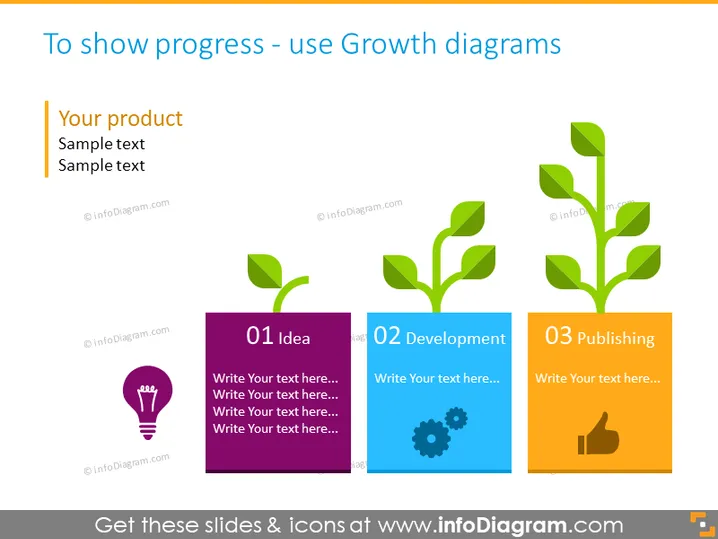
The PowerPoint slide is designed to visually represent the stages of growth or progression, typically used to illustrate the development of a product or concept. It features three key stages: "01 Idea," "02 Development," and "03 Publishing." Each stage has a dedicated color - purple for "Idea," green for "Development," and orange for "Publishing." They are symbolized by a sapling that grows from a seedling into a mature plant, suggesting progress and maturity. The idea phase highlights brainstorming symbolized by a light bulb, development is represented by gears suggesting refinement, and publishing is denoted by a thumbs-up icon, indicating completion or success.
Graphical Look
- The slide has a clear, colorful layout with ample white space around objects for an uncluttered look.
- Three vertically aligned rectangular blocks, each depicting a different stage, are presented with a growth metaphor using plant illustrations.
- Each rectangle has a bold number and title at the top, with placeholder text below where additional information can be added.
- The colors are distinct for each phase: purple for the "Idea" stage, green for "Development," and orange for "Publishing."
- Relevant icons are used within each colored block to represent the specific stage visually: a light bulb for "Idea," gears for "Development," and a thumbs-up for "Publishing."
- There's a small, subtle shadow effect behind each colored rectangle, giving depth to the slide's visual composition.
The overall look of the slide is professional and engaging, utilizing both color and visual metaphors to effectively communicate the concept of progress or growth in a sequential manner.
Use Cases
- To present the stages of a project or product development during business meetings.
- To visualize company growth milestones or achievements in an annual report or investors' presentation.
- For educational purposes, to explain the process of nurturing an idea to implementation and impact.
- As a a template for creative or marketing teams to structure and showcase campaign rollouts in a visual timeline format.
How to Edit
How to edit text & colors

How to expand / shorten diagram

How to Replace Icons in infoDiagram PPT


