Reviews
Sus gráficos añaden un toque agradable a mis presentaciones y recientemente los usé para una de mis reuniones generales. Su conjunto de herramientas añade profesionalismo a mis diapositivas. En lugar de usar imágenes prediseñadas estándar.
Necesitaba un aspecto fresco para algunas de mis diapositivas. Había intentado encontrar una forma de crear un efecto de pincel, de subrayar, acentuar, añadir algo de color y los marcadores escritos a mano fueron justo lo que necesitaba. Muy fácil de usar, fácil de ajustar el tamaño, cambiar el color. Fue una solución asequible y perfecta, y estoy feliz de recomendarla.
El aspecto nítido y limpio de los gráficos, y el hecho de que me permitiera editar y cambiar fácilmente los colores para que coincidieran con la plantilla fue mi principal razón para comprarlos.
Description
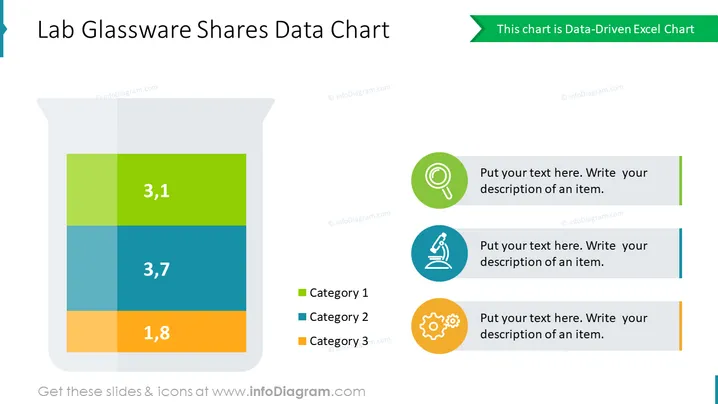
Lab Glassware Shares Data Chart
Slide Content
The slide presents a data chart depicting the distribution of values across three different categories within a laboratory glassware diagram, which acts as a data visualization metaphor. Each category is represented by a distinct color, with numbers indicating their respective values: 3.1 for Category 1 (green), 3.7 for Category 2 (blue), and 1.8 for Category 3 (orange). Next to the chart, there are placeholders for text descriptions, each accompanied by a unique icon to symbolize different data points or observations.

Graphical Look
- The slide background is a clean white color.
- A large illustration of a laboratory flask occupies the center-left of the slide, containing a stacked bar chart.
- The bar chart within the flask is segmented into three colored sections representing different data categories.
- The top segment is green labeled with "3,1" signifying Category 1.
- The middle segment is blue with "3,7" indicating Category 2.
- The bottom segment is orange with "1,8" corresponding to Category 3.
- To the right of the flask, there are three circular icons, each with a different symbol:
- A magnifying glass icon in the top circle, implying analysis or scrutiny.
- A microscope icon in the middle circle, indicating research or examination.
- A gear icon in the bottom circle, symbolizing settings or mechanism.
- Next to each icon is a text placeholder with a green bar on the left, prompting users to add a description.
- The slide has a header with a dark green accent color.
- The overall look of the slide is modern and professional with a science-themed design. The use of a lab flask as a metaphorical chart and distinct icons gives a clear and engaging visual representation of data.
Use Cases
- Presenting research results in a scientific or academic setting, where visual metaphors help clarify data segments.
- Sharing market segmentation or product distribution figures in a business meeting, using the glassware as a unique representation of market share.
- Illustrating levels of investment or resource allocation in different departments during a corporate strategy presentation.
- Communicating data during a pitch to investors or stakeholders in a startup that operates within the biotech or pharmaceutical industry.
How to Edit
How to edit text & colors

How to expand / shorten diagram

How to Replace Icons in infoDiagram PPT

