Reviews
Ihre Grafiken verleihen meinen Präsentationen eine nette Note, und ich habe sie kürzlich für eines meiner All-Hands-Meetings verwendet. Ihre Toolbox verleiht meinen Folien Professionalität, anstatt Standard-Clipart zu verwenden.
Ich brauchte einen neuen Blick auf einige meiner Folien. Ich habe versucht, einen Weg zu finden, einen Pinselschlag-Effekt zu erzielen, um zu unterstreichen, hervorzuheben, Farbe hinzuzufügen, und die handgeschriebenen Markierungen waren genau das Richtige. Sehr einfach zu bedienen, leicht in der Größe zu ändern, die Farbe zu ändern. Es war eine erschwingliche, perfekte Lösung und ich empfehle sie gerne weiter.
Die klare, saubere Optik der Grafiken und die Tatsache, dass ich die Farben leicht bearbeiten und an die Vorlage anpassen konnte, war mein Hauptgrund für den Kauf.
Description
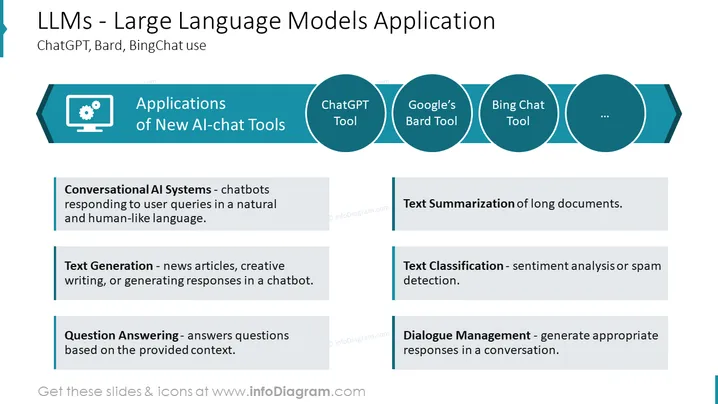
LLMs - Large Language Models Application
Slide Content: The slide is about the applications of new AI-chat tools with a focus on Large Language Models (LLMs) including ChatGPT, Bard, and BingChat. It lists several use cases: Conversational AI Systems refer to chatbots that simulate human-like interactions by responding to queries. Text Generation implies the creation of content like news articles or literary pieces through AI. Question Answering involves AI providing answers to queries based on context. Text Summarization is the process of condensing lengthy documents into shorter summaries. Text Classification involves categorizing text, such as determining sentiment or identifying spam. Dialogue Management is about AI crafting suitable responses within conversations.
Graphical Look:
- The slide title is in bold, dark blue text at the top followed by a subtitle mentioning specific tools.
- Below the title, on the left, there is a dark blue, hexagon-like shape with a gear icon, labeled "Applications of New AI-chat Tools."
- The right side of the slide features a horizontal series of interconnected round shapes in varying shades of blue, each labeled with a different AI tool, ending with an arrow pointing to the right indicating continuation.
- Benearh, there are six gray text boxes with explanations, aligned horizontally across the slide.
- Each text box has a colored line on its left side that matches the color of its corresponding round icon above.
The overall look of the slide is sleek and modern, using a consistent blue color palette to convey a sense of technology and innovation. The graphic elements are arranged in a balanced manner that guides the viewer's eye from left to right.
Use Cases:
- To inform stakeholders about the capabilities and advancements in AI technology relevant to their industry.
- In a strategy meeting to discuss potential integration of AI tools like ChatGPT into business processes.
- Educational settings, where the slide can be used to teach students about AI applications.
- Marketing or sales presentations to showcase how an organization is leveraging cutting-edge AI technologies like LLMs to improve customer experience or business operations.
How to Edit
How to edit text & colors

How to expand / shorten diagram

How to Replace Icons in infoDiagram PPT


