Reviews
Your graphics add a nice touch to my presentations and I recently used them for one of my all-hands meetings. Your toolbox adds professionalism to my slides. Instead of using standard clipart.
I needed a fresh look at some of my slides. I've tried to find a way to create a paintbrush effect, to underline, accentuate, add some color and the handwritten markers were just the things. Very easy to use, easy to size, change the color. It was an affordable, perfect solution and I'm happy to recommend it.
The crisp, clean look of the graphics, and the fact that it allowed me to easily edit and change the colors to match the template was my main reason for purchasing them.
Description
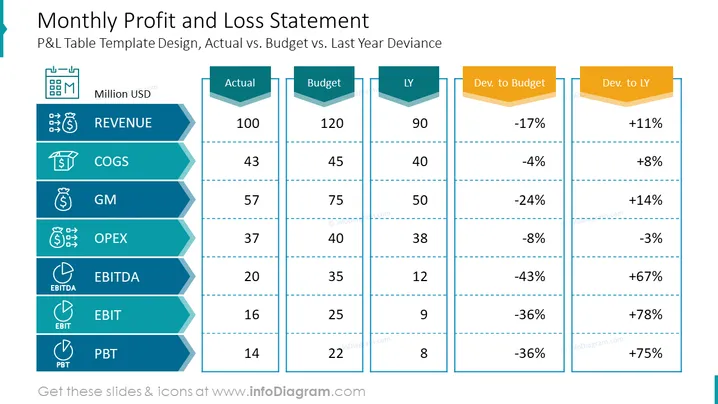
Monthly Profit and Loss Statement
P&L Table Template Design, Actual vs. Budget vs. Last Year Deviance
Slide Content
The slide presents a comparative analysis of financial performance, showcasing "Actual" vs. "Budget" vs. "Last Year (LY)" figures for key financial metrics including REVENUE, COGS (Cost of Goods Sold), GM (Gross Margin), OPEX (Operating Expenses), EBITDA (Earnings Before Interest, Taxes, Depreciation, and Amortization), EBIT (Earnings Before Interest and Taxes), and PBT (Profit Before Tax). For each metric, deviations to budget and last year are provided, showing performance in percentages, indicating areas of overperformance or underperformance.
Graphical Look
- The title of the slide is prominently displayed at the top, employing a large font size and capitalized letters.
- Six color-coordinated blue tags to the left represent financial categories, each supplemented with a white icon for visual association.
- The center portion consists of three separated columns labeled "Actual", "Budget", and "LY", with corresponding numerical values placed against each financial category.
- Two additional columns to the right display percentages, indicating the deviation from the budget ("Dev. to Budget") and the deviation from the previous year ("Dev. to LY"), set in golden arrow-shaped forms.
- Horizontal dotted lines across the columns serve to delineate each financial metric and facilitate ease of reading across the slide.
- The colors used on the slide are mainly a palette of blue for the metrics categories, whites and soft greys for the text and background, and golden yellow for the deviation indicators.
The overall look of the slide is polished and professional, employing a harmonious color scheme and clear, concise icons to enhance comprehension. The visual design effectively conveys quantitative data and comparative analysis with an elegant graphical representation.
Use Cases
- To present a company's financial performance in monthly management or stakeholder meetings.
- For financial analysts to illustrate variance analyses during financial reviews or audits.
- Utilized by CFOs and finance teams to discuss budget adherence and financial health during board presentations.
- Can be adapted for quarterly or annual financial reporting to highlight performance trends and profitability over time.
How to Edit
How to edit text & colors

How to expand / shorten diagram

How to Replace Icons in infoDiagram PPT


