Reviews
Your graphics add a nice touch to my presentations and I recently used them for one of my all-hands meetings. Your toolbox adds professionalism to my slides. Instead of using standard clipart.
I needed a fresh look at some of my slides. I've tried to find a way to create a paintbrush effect, to underline, accentuate, add some color and the handwritten markers were just the things. Very easy to use, easy to size, change the color. It was an affordable, perfect solution and I'm happy to recommend it.
The crisp, clean look of the graphics, and the fact that it allowed me to easily edit and change the colors to match the template was my main reason for purchasing them.
Description
Users by Devices Type Chart: Mobile, Desktop PC, Tablet
Slide Content
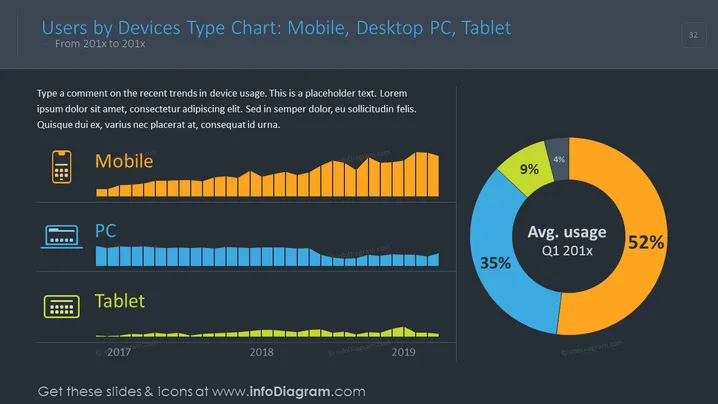
The slide presents a data comparison among mobile, desktop PC, and tablet users over a certain period, from 201x to 201x. Each device type has a corresponding bar chart that displays the trend of usage. Additionally, an average usage pie chart for Q1 201x breaks down the percentages. Mobiles show a consistent or growing trend, desktop PCs possibly indicate a decline, whereas tablets depict a minor usage. The written content suggests an analysis of these trends, but it's placeholder text.
Graphical Look
- The slide background is dark with blue and orange elements, creating a strong contrast for readability.
- There are three horizontal bar charts, each with a different color: mobile is orange, PC is blue, and tablet is green.
- A large pie chart on the right-hand side displays the average usage for Q1 201x, with segmented colors corresponding to the devices.
- Above the bar charts, there are icons representing each device: a mobile phone, a desktop, and a tablet, enhancing visual understanding.
- The slide title is positioned at the top-left, with a subtle underline that separates it from the rest of the content.
- Text placeholders for commentary are provided on the left side, to be personalized with specific insights.
- Slide numbering is discreetly located in the top-right corner.
The graphics and icons used are simple yet informative, providing an at-a-glance understanding of the data trends. Color-coding for each device type unifies the theme and makes the data immediately recognizable.
Use Cases
- Presenting user behavior trends over time for different technology devices in a business meeting.
- Visualizing market research data on device usage for strategic planning in marketing.
- Showcasing the change in consumer device preferences in an investor pitch to support product development directions.
- Using in an educational setting to illustrate data interpretation and report presentations to students.
How to Edit
How to edit text & colors

How to expand / shorten diagram

How to Replace Icons in infoDiagram PPT


