Reviews
Ihre Grafiken verleihen meinen Präsentationen eine nette Note, und ich habe sie kürzlich für eines meiner All-Hands-Meetings verwendet. Ihre Toolbox verleiht meinen Folien Professionalität, anstatt Standard-Clipart zu verwenden.
Ich brauchte einen neuen Blick auf einige meiner Folien. Ich habe versucht, einen Weg zu finden, einen Pinselschlag-Effekt zu erzielen, um zu unterstreichen, hervorzuheben, Farbe hinzuzufügen, und die handgeschriebenen Markierungen waren genau das Richtige. Sehr einfach zu bedienen, leicht in der Größe zu ändern, die Farbe zu ändern. Es war eine erschwingliche, perfekte Lösung und ich empfehle sie gerne weiter.
Die klare, saubere Optik der Grafiken und die Tatsache, dass ich die Farben leicht bearbeiten und an die Vorlage anpassen konnte, war mein Hauptgrund für den Kauf.
Description
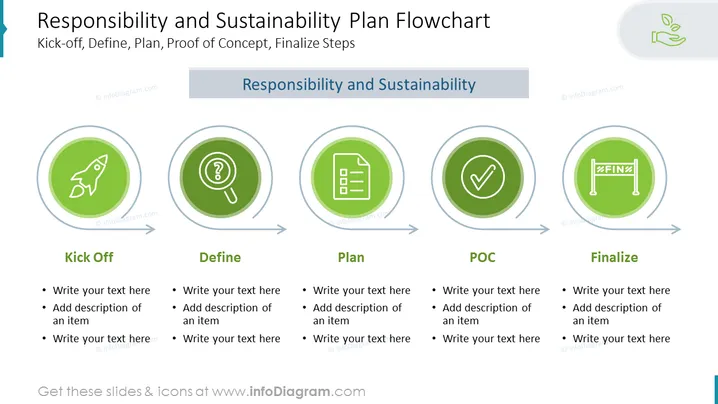
Responsibility and Sustainability Plan Flowchart
Slide Content
The slide presents a flowchart illustrating the stages of a Responsibility and Sustainability Plan which include Kick-off, Define, Plan, POC (Proof of Concept), and Finalize. Each stage is visually represented by a circular icon with symbolic graphics: a rocket for Kick-off indicating the project start, a magnifying glass for Define suggesting detailed examination, a checklist for Plan to denote organization, a verified check for POC indicating validation, and a finish flag for Finalize representing completion of the process. Accompanying lists provide space for descriptions and elaboration of each step's details.
Graphical Look
- The slide background is white with a blue banner at the top containing the slide title in large, bold text.
- Five circular green icons with white symbols are horizontally aligned; each icon represents a stage in the flowchart.
- The icons are linked by dark gray arrows indicating the progression from one stage to the next.
- Each icon is circled by a lighter green ring, suggesting a clickable button or interactive element.
- Below each icon, there are corresponding titles in dark gray text, namely "Kick Off," "Define," "Plan," "POC," and "Finalize."
- Below each title, there is a placeholder text with bullet points signaling where to add descriptions.
- The visual design of the slide is clean, modern, and uses a consistent green color scheme to unify elements.
The overall look of the slide is professional, with a clear visual flow that guides the viewer through the different stages of the plan. The icons are simple yet effective in conveying the distinct phases of the process.
Use Cases
- To visually structure a project plan during a business meeting, helping team members understand the various phases.
- As part of a project management training session, to introduce the concept of stages in sustainable planning.
- In a proposal presentation to demonstrate to stakeholders or clients how a project will unfold from inception to completion.
- During - During internal strategy sessions to map out the steps and responsibilities associated with implementing sustainability initiatives within an organization.
How to Edit
How to edit text & colors

How to expand / shorten diagram

How to Replace Icons in infoDiagram PPT


