Reviews
Your graphics add a nice touch to my presentations and I recently used them for one of my all-hands meetings. Your toolbox adds professionalism to my slides. Instead of using standard clipart.
I needed a fresh look at some of my slides. I've tried to find a way to create a paintbrush effect, to underline, accentuate, add some color and the handwritten markers were just the things. Very easy to use, easy to size, change the color. It was an affordable, perfect solution and I'm happy to recommend it.
The crisp, clean look of the graphics, and the fact that it allowed me to easily edit and change the colors to match the template was my main reason for purchasing them.
Description
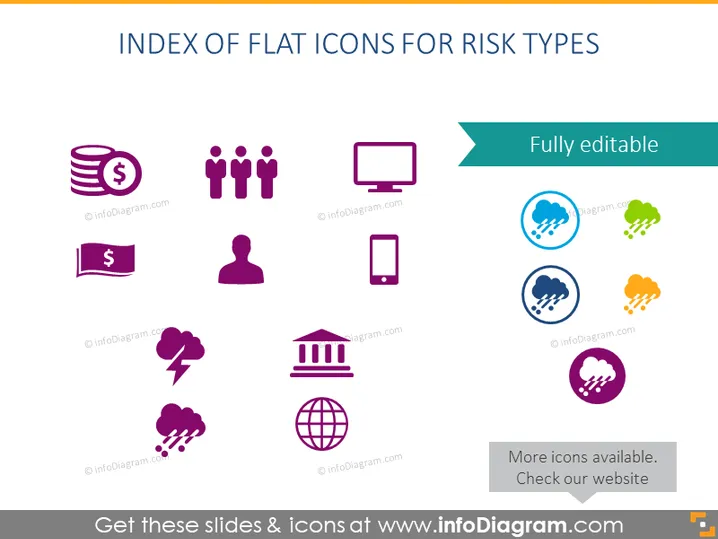
INDEX OF FLAT ICONS FOR RISK TYPES
Slide Content
The slide presents a collection of flat icons representing various types of risks, with an emphasis on business and technology. The icons depict financial risk (coins with a dollar sign), group risk (multiple figures), technology risk (a computer monitor), and mobile risk (a smartphone), each explaining the different areas where risks may occur, such as monetary losses, team-related issues, potential IT infrastructure problems, and vulnerabilities in mobile computing.
Graphical Look
- The slide background is plain white for a clean, minimalist appearance.
- The title "INDEX OF FLAT ICONS FOR RISK TYPES" is prominent at the top in a large, dark font.
- Just below the title, there is a teal-colored ribbon with the phrase "Fully editable" indicating that the slide contents can be customized.
- A grid of 3x3 icons is centered on the slide, each icon distinct in color and set in a light circle.
- The icons use a simple, modern flat design aesthetic and are in a range of colors including purple, blue, green, and orange, creating visual interest.
- The icons are uniformly spaced, giving the slide a well-organized and structured look.
- The icons themselves represent various risk-related concepts, such as money, people, a building representing institutional risk, a bolt of lightning for sudden incidents, and more abstract concepts like networks or global risk indicated by a globe icon.
The slide has a modern and professional appearance, with the use of flat icons enabling easy interpretation of the risk themes. The color coding and simple graphics contribute to the slide's clear and instructive visual hierarchy.
Use Cases
- To introduce a section on risk management in a business strategy presentation, outlining different risk domains.
- In an educational context, to teach about various types of risks in project management or business courses.
- As a visual aid in a report or proposal to stakeholders, to quickly summarize potential risk areas that a project or investment may face.
- During workshops or seminars focused on risk assessment, to facilitate discussions on identifying and categorizing different risks.
How to Edit
How to edit text & colors

How to expand / shorten diagram

How to Replace Icons in infoDiagram PPT


