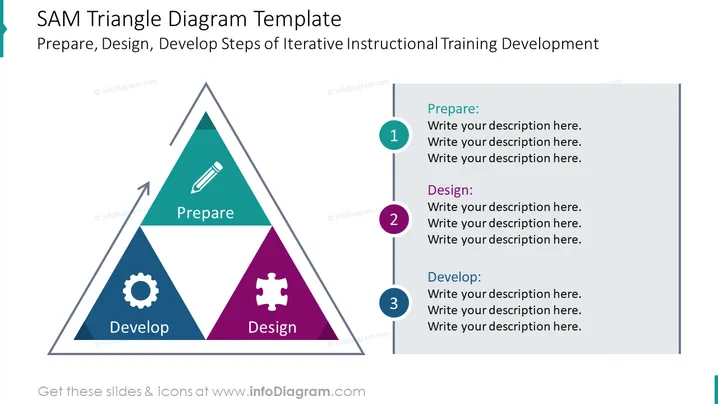
SAM Triangle Diagram Template
Slide Content:
The SAM Triangle Diagram Template is a visual representation of the Successive Approximation Model (SAM), a three-step iterative instructional training development process. The three steps of the SAM model are:
- Prepare: This step involves defining the learning objectives, assessing the learners' needs, and developing an instructional plan.
- Design: This step involves creating the instructional materials, such as lesson plans, activities, and assessments.
- Develop: This step involves delivering the instruction to the learners and collecting feedback.
Graphical Look:
The SAM Triangle Diagram Template is a simple yet effective way to visualize the SAM instructional training development process. The template consists of a triangle with three equal sides, each representing one of the three steps of the SAM model. The sides of the triangle are connected by arrows, indicating the iterative nature of the process.
The template is visually appealing and easy to understand. The use of a triangle shape reinforces the idea that the SAM model is a three-step process. The arrows connecting the sides of the triangle highlight the iterative nature of the process.
The template is also customizable. The text and icons can be easily edited to reflect the specific needs of the instructional designer.
Overall, the SAM Triangle Diagram Template is a valuable tool for instructional designers who want to create a visually appealing and easy-to-understand representation of the SAM instructional training development process.
Where to use such a slide?
The SAM Triangle Diagram Template can be used in a variety of settings, including:
- Presentations to stakeholders: Instructional designers can use the template to present the SAM instructional training development process to stakeholders, such as managers, clients, and trainers. The template can help stakeholders understand the process and how it can be used to create effective instructional training programs.
- Professional development workshops: Instructional designers can use the template to facilitate professional development workshops on the SAM instructional training development process. The template can help participants learn about the process and how to apply it to their own work.
- Instructional design textbooks and articles: Instructional designers can use the template to create illustrations for instructional design textbooks and articles. The template can help readers visualize the SAM instructional training development process and understand its key components.
When presenting the SAM Triangle Diagram Template to stakeholders, instructional designers should highlight the iterative nature of the process. They should explain that the three steps of the SAM model are not mutually exclusive, but rather that they are interconnected. For example, instructional designers may need to revisit the "Prepare" step after developing and delivering the instruction in order to ensure that the learning objectives have been met.
Instructional designers should also use the SAM Triangle Diagram Template to explain how they plan to collect and use feedback from stakeholders and learners throughout the instructional training development process. This feedback can be used to improve the instruction and ensure that it is meeting the needs of the learners.