Reviews
Your graphics add a nice touch to my presentations and I recently used them for one of my all-hands meetings. Your toolbox adds professionalism to my slides. Instead of using standard clipart.
I needed a fresh look at some of my slides. I've tried to find a way to create a paintbrush effect, to underline, accentuate, add some color and the handwritten markers were just the things. Very easy to use, easy to size, change the color. It was an affordable, perfect solution and I'm happy to recommend it.
The crisp, clean look of the graphics, and the fact that it allowed me to easily edit and change the colors to match the template was my main reason for purchasing them.
Description
Scrum Process Loop Thick Arrow
Slide Content
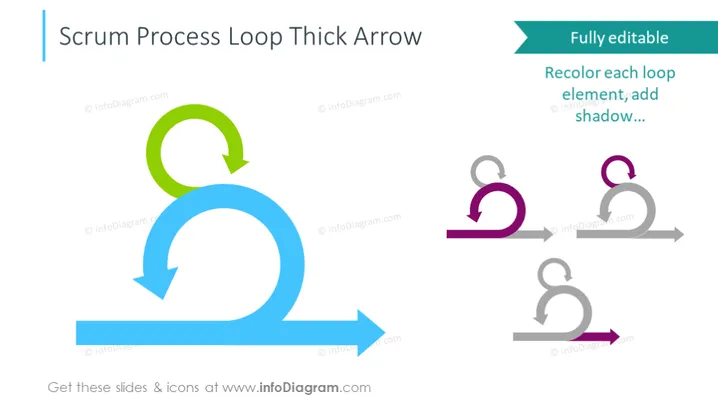
The PowerPoint slide titled "Scrum Process Loop Thick Arrow" illustrates the cyclical nature of the Scrum process, a framework within agile methodology. The highlighted graphic represents the iterative process in Scrum, which consists of repetitions of work cycles to develop a product. The slide features a statement about the graphic being fully editable, suggesting viewers can recolor each loop element and add shadow for customization to fit their specific presentation needs.
Graphical Look
- A large blue thick arrow forms a loop, with a small green arrow looping off of the main blue arrow, symbolizing the continuous iterative process of Scrum.
- Three smaller versions of the loop occur in a row on the right in shades of gray and purple, indicating different customizable styles for the loop.
- A prominent turquoise callout box states, "Fully editable" followed by instructions like "Recolor each loop element; add shadow..." emphasizing the customizability of the slide contents.
- The slide has a simple, uncluttered look, primarily using flat design elements without complex textures or patterns.
The overall aesthetic of the slide is modern and clean, utilizing minimalist graphical elements to focus on the concept being presented. The color contrast between the blue and green arrows and the gray background helps direct viewer attention to the iterative process represented.
Use Cases
- Presenting the Scrum framework to teams unfamiliar with agile methodologies.
- Illustrating the continuous improvement aspect during Scrum training sessions.
- Customizing the slide to fit a company's branding during an internal presentation.
- Explaining the iterative development cycle during a project management workshop.
How to Edit
How to edit text & colors

How to expand / shorten diagram

How to Replace Icons in infoDiagram PPT


