

Your graphics add a nice touch to my presentations and I recently used them for one of my all-hands meetings. Your toolbox adds professionalism to my slides. Instead of using standard clipart.
Claude Jones, Director of Engineer, @Walmartlabs, USA

Your graphics add a nice touch to my presentations and I recently used them for one of my all-hands meetings. Your toolbox adds professionalism to my slides. Instead of using standard clipart.
Claude Jones, Director of Engineer, @Walmartlabs, USA
I needed a fresh look at some of my slides. I've tried to find a way to create a paintbrush effect, to underline, accentuate, add some color and the handwritten markers were just the things. Very easy to use, easy to size, change the color. It was an affordable, perfect solution and I'm happy to recommend it.
Anonymous, US
The crisp, clean look of the graphics, and the fact that it allowed me to easily edit and change the colors to match the template was my main reason for purchasing them.
Brandie Jenkins, E-learning Developer, USA
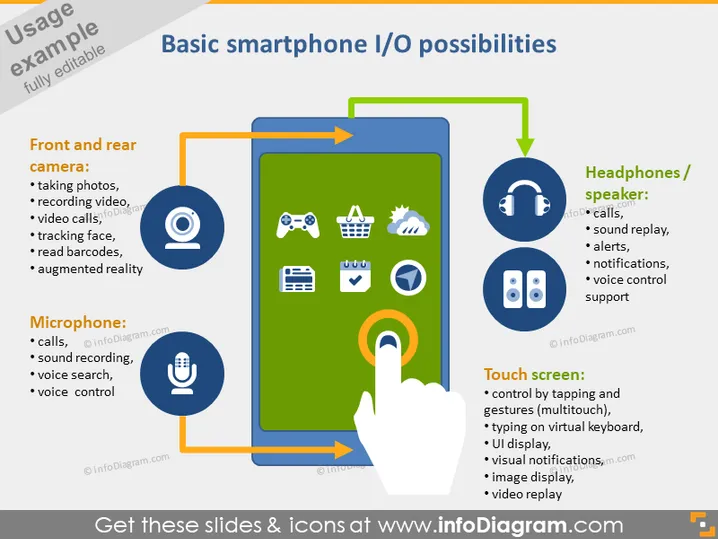
The PowerPoint slide is titled "Basic smartphone I/O possibilities" and discusses various input and output features of a smartphone. It is divided into four sections: "Front and rear camera," which includes taking photos, recording video, video calls, tracking face, reading barcodes, and augmented reality; "Microphone," covering calls, sound recording, voice search, and voice control; "Headphones/speaker," related to calls, sound replay, alerts, notifications, and voice control support; "Touch screen," encompasses control by tapping and gestures, typing on a virtual keyboard, user interface display, visual notifications, image display, and video replay.
The slide has a modern and engaging design, utilizing a mix of graphics and text to visually connect the smartphone features with their explanations. The use of color and 3D effects gives the slide depth and focuses attention on the central smartphone graphic.



