Reviews
Your graphics add a nice touch to my presentations and I recently used them for one of my all-hands meetings. Your toolbox adds professionalism to my slides. Instead of using standard clipart.
I needed a fresh look at some of my slides. I've tried to find a way to create a paintbrush effect, to underline, accentuate, add some color and the handwritten markers were just the things. Very easy to use, easy to size, change the color. It was an affordable, perfect solution and I'm happy to recommend it.
The crisp, clean look of the graphics, and the fact that it allowed me to easily edit and change the colors to match the template was my main reason for purchasing them.
Description
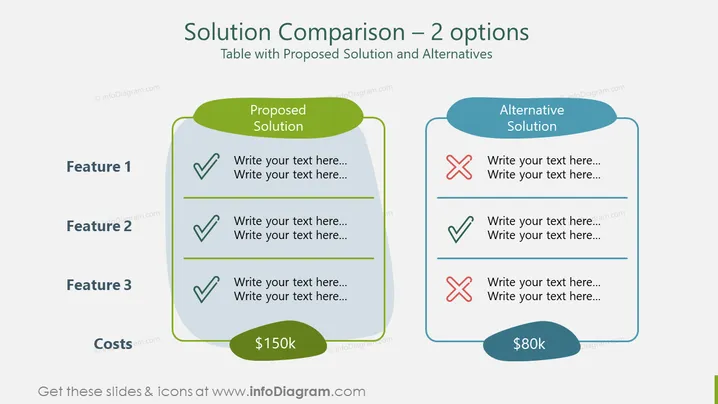
Solution Comparison – 2 options
Slide Content:
The PowerPoint slide outlines a comparison between two solutions, highlighting their features and costs. The proposed solution has three features, all positively marked, suggesting that it meets all the necessary criteria. The alternative solution has a mixed review with one feature marked positive, and two negative, indicating it doesn't fully meet the required standards. The proposed solution is costlier at $150k, while the alternative is cheaper at $80k, suggesting a trade-off between cost and features.
Graphical Look:
- Two side-by-side comparison tables with rounded corners; left for the Proposed Solution, right for the Alternative Solution.
- Green and blue color themes differentiate the two solutions.
- Checkmarks (✓) and cross marks (✗) in corresponding colors indicate the presence or absence of features.
- Text placeholders suggest where to add specific descriptions for each feature.
- The bottom of each table shows the cost associated with each solution, within a pill-shaped color-matched badge.
The overall look of the slide is clean and professional, utilizing a straightforward design to enable a clear comparison between two options. The color coding and the checkmarks/cross marks provide an immediate visual cue to the viewer about the suitability of each solution.
Use Cases:
- Presenting budget options for a project to stakeholders.
- Comparing product offerings to potential clients.
- Decision-making meetings where visual aids are necessary to illustrate the pros and cons of each option.
- Strategy sessions to discuss the implications of choosing one solution over another based on features and costs.
How to Edit
How to edit text & colors

How to expand / shorten diagram

How to Replace Icons in infoDiagram PPT


