Reviews
Your graphics add a nice touch to my presentations and I recently used them for one of my all-hands meetings. Your toolbox adds professionalism to my slides. Instead of using standard clipart.
I needed a fresh look at some of my slides. I've tried to find a way to create a paintbrush effect, to underline, accentuate, add some color and the handwritten markers were just the things. Very easy to use, easy to size, change the color. It was an affordable, perfect solution and I'm happy to recommend it.
The crisp, clean look of the graphics, and the fact that it allowed me to easily edit and change the colors to match the template was my main reason for purchasing them.
Description
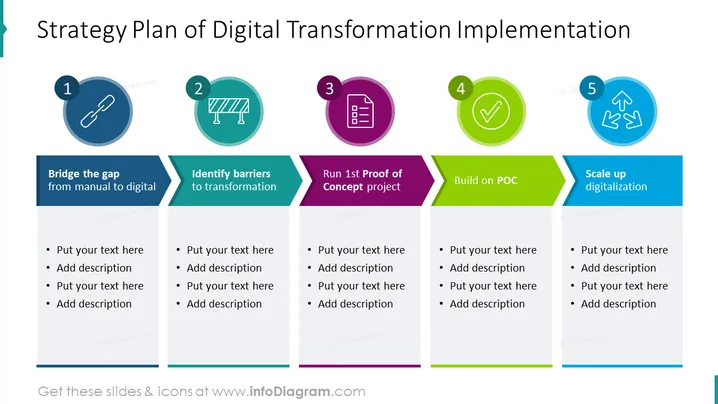
Strategy Plan of Digital Transformation Implementation
Slide Content:
The PowerPoint slide outlines a five-step process for implementing a digital transformation strategy:
- Bridge the gap from manual to digital
- Identify barriers to transformation
- Run 1st Proof of Concept project
- Build on POC (Proof of Concept)
- Scale up digitalization
Each step suggests a progression from assessing current practices, identifying and overcoming challenges, testing new ideas, refining successful innovations, and then expanding digital initiatives across the organization.
Graphical Look:
- Title in bold text at the top of the slide.
- Five numbered circular icons arranged horizontally across the slide.
- Icons are colored in shades of blue, teal, purple, green, and light blue.
- Below each icon is a text box summarizing the step.
The slide has a clean, professional design with a color-coordinated scheme that visually distinguishes each step in the strategy. Icons and banners facilitate easy reading and comprehension.
Use Cases:
This slide is suitable for business presentations aimed at guiding a team or organization through the stages of digital transformation. It can be used in strategic planning meetings, workshops on digital innovation, and training sessions for staff who are involved in implementing digital changes. It helps to structure the discussion and provides a clear roadmap for transformation efforts.
How to Edit
How to edit text & colors

How to expand / shorten diagram

How to Replace Icons in infoDiagram PPT


