Reviews
Sus gráficos añaden un toque agradable a mis presentaciones y recientemente los usé para una de mis reuniones generales. Su conjunto de herramientas añade profesionalismo a mis diapositivas. En lugar de usar imágenes prediseñadas estándar.
Necesitaba un aspecto fresco para algunas de mis diapositivas. Había intentado encontrar una forma de crear un efecto de pincel, de subrayar, acentuar, añadir algo de color y los marcadores escritos a mano fueron justo lo que necesitaba. Muy fácil de usar, fácil de ajustar el tamaño, cambiar el color. Fue una solución asequible y perfecta, y estoy feliz de recomendarla.
El aspecto nítido y limpio de los gráficos, y el hecho de que me permitiera editar y cambiar fácilmente los colores para que coincidieran con la plantilla fue mi principal razón para comprarlos.
Description
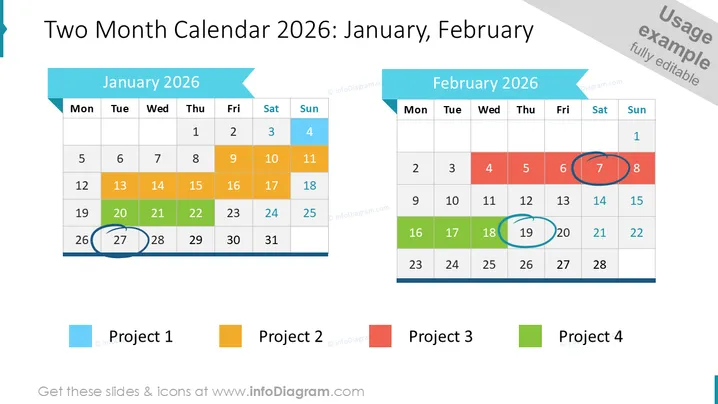
Two Month Calendar 2026 : January, February
Slide Content
The slide presents a two-month calendar for January and February 2025, with days color-coded for greater clarity in project scheduling. Four color-coded categories align with respective projects: 'Project 1' in light blue, 'Project 2' in orange, 'Project 3' in red, and 'Project 4' in green. Certain dates are highlighted with colored circles to indicate project milestones or deadlines - blue circles for 'Project 1', green circles for 'Project 4', and red circles for 'Project 3'.
Graphical Look
- Two large rectangular blocks arranged side by side, representing the months of January and February.
- Each block contains a grid of cells delineating the days of the week, with weekends shaded in light blue.
- The top of each block features a ribbon banner in different shades of blue with the names of the months.
- Color-coding within the calendar cells corresponds to different projects.
- Colored circles are drawn around specific dates to highlight importance or events.
- Beneath the calendars are color-coded keys labeled 'Project 1', 'Project 2', 'Project 3', and 'Project 4'.
The overall look is clean and organized, with a straightforward design focusing on clarity and ease of understanding the calendar. The color-coding and highlighted dates make it easy to visually scan for relevant project information.
Use Cases
- Planning and illustrating timelines for multiple parallel projects in a business presentation.
- Highlighting milestone events or deadlines during project progress reviews with team members or stakeholders.
- Organizing and sharing company-wide or department-specific schedules in a visual format.
- Using as a visual aid during strategy meetings to align schedules and resource allocation across teams.
How to Edit
How to edit text & colors

How to expand / shorten diagram

How to Replace Icons in infoDiagram PPT


