

Your graphics add a nice touch to my presentations and I recently used them for one of my all-hands meetings. Your toolbox adds professionalism to my slides. Instead of using standard clipart.
Claude Jones, Director of Engineer, @Walmartlabs, USA

Your graphics add a nice touch to my presentations and I recently used them for one of my all-hands meetings. Your toolbox adds professionalism to my slides. Instead of using standard clipart.
Claude Jones, Director of Engineer, @Walmartlabs, USA
I needed a fresh look at some of my slides. I've tried to find a way to create a paintbrush effect, to underline, accentuate, add some color and the handwritten markers were just the things. Very easy to use, easy to size, change the color. It was an affordable, perfect solution and I'm happy to recommend it.
Anonymous, US
The crisp, clean look of the graphics, and the fact that it allowed me to easily edit and change the colors to match the template was my main reason for purchasing them.
Brandie Jenkins, E-learning Developer, USA
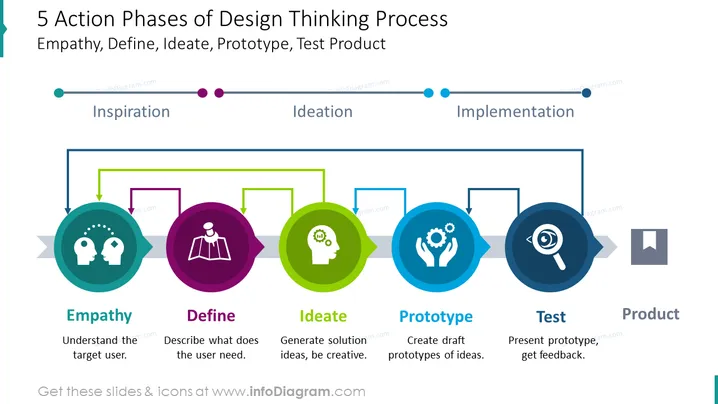
This is an infographic slide with a design thinking actions diagram. In the inspiration process, we are showing empathy – understanding the target user, along with describing what the user needs. In the ideation process, we ideate a general solution and try to be creative. Then, we create draft prototypes of ideas. And lastly, during the implementation process, we are doing a test – presenting a prototype, and getting feedback. After all these phases are finished, we have the final product. We have presented this information with a diagram, to help your audience understand the whole process as mutually dependent, along with vivid colors, to help them distinguish each process. You can edit the graphics (e.g. changing the colors with your company logo, etc.), and resize the shapes as you find fit. Video instructions included.
Diagram, Color Coding, Line Vectors, Touch Points, Flat Outline Icons, Brain Interaction Icon Vector, Pinned Map Icon, Head Gear Icon, Creation Icon, Magnifying Glass Icon



