Reviews
Your graphics add a nice touch to my presentations and I recently used them for one of my all-hands meetings. Your toolbox adds professionalism to my slides. Instead of using standard clipart.
I needed a fresh look at some of my slides. I've tried to find a way to create a paintbrush effect, to underline, accentuate, add some color and the handwritten markers were just the things. Very easy to use, easy to size, change the color. It was an affordable, perfect solution and I'm happy to recommend it.
The crisp, clean look of the graphics, and the fact that it allowed me to easily edit and change the colors to match the template was my main reason for purchasing them.
Description
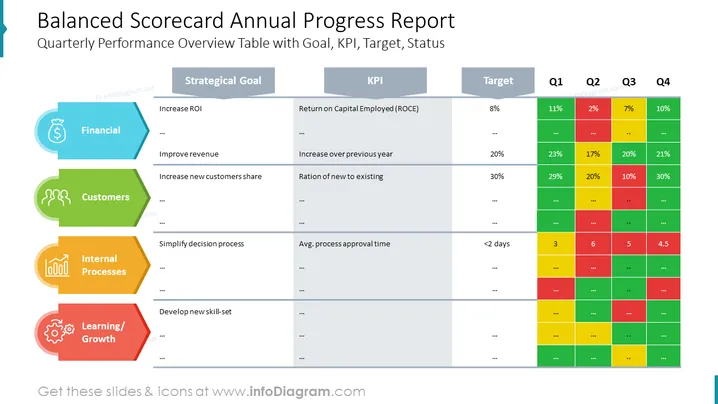
Balanced Scorecard Annual Progress Report
Slide Content
The slide is titled "Balanced Scorecard Annual Progress Report" and depicts a Quarterly Performance Overview Table with Goal, KPI, Target, and Status. The key metrics tracked include financial aspects such as increasing ROI, where the target is set at 8% and progress is tracked quarterly with various percentages achieved in each quarter. Customer-related goals involve increasing new customers' share, targeting a 30% ratio of new to existing customers. Internal processes focus on simplifying the decision-making process aiming for an average process approval time of less than 2 days. Lastly, Learning/Growth pertains to the development of new skill sets, although specific KPIs and targets are not visible on the slide.
Graphical Look
- Large slide title at the top with a light blue background.
- Four main categories on the left side, each with its unique color and icon: Financial (blue with dollar symbol), Customers (green with grouped figures), Internal Processes (yellow with gears), and Learning/Growth (red with a light bulb and cogwheel).
- A header row spans across the slide, consisting of dark grey cells with white text for 'Strategical Goal', 'KPI', ‘Target’, and each quarter (Q1 - Q4).
- Each category on the left is associated with rows displaying specific goals, Key Performance Indicators (KPIs), and targets in corresponding colors, followed by colored status cells for each quarter that use shades of green, yellow, and red to indicate performance.
The overall look of the slide is highly structured and uses a color-coding system to denote the different areas of the balanced scorecard (financial, customer, internal processes, and learning/growth), with visually distinct sections for goals, KPIs, targets, and quarterly status updates.
Use Cases
- Presenting to stakeholders the annual progress on various strategic objectives during a yearly review meeting.
- Reviewing with teams the company performance across different departments, such as finance, customer service, and operations during quarterly business review meetings.
- Utilizing in strategic planning sessions to align goals and ensure that all aspects of the business are considered.
- The slide can also be used for training purposes to illustrate the balanced scorecard approach to new employees or team members who need to understand corporate strategy and performance measurement.
How to Edit
How to edit text & colors

How to expand / shorten diagram

How to Replace Icons in infoDiagram PPT


