Reviews
Sus gráficos añaden un toque agradable a mis presentaciones y recientemente los usé para una de mis reuniones generales. Su conjunto de herramientas añade profesionalismo a mis diapositivas. En lugar de usar imágenes prediseñadas estándar.
Necesitaba un aspecto fresco para algunas de mis diapositivas. Había intentado encontrar una forma de crear un efecto de pincel, de subrayar, acentuar, añadir algo de color y los marcadores escritos a mano fueron justo lo que necesitaba. Muy fácil de usar, fácil de ajustar el tamaño, cambiar el color. Fue una solución asequible y perfecta, y estoy feliz de recomendarla.
El aspecto nítido y limpio de los gráficos, y el hecho de que me permitiera editar y cambiar fácilmente los colores para que coincidieran con la plantilla fue mi principal razón para comprarlos.
Description
Company At-a-Glance Slide Template
Slide Content:
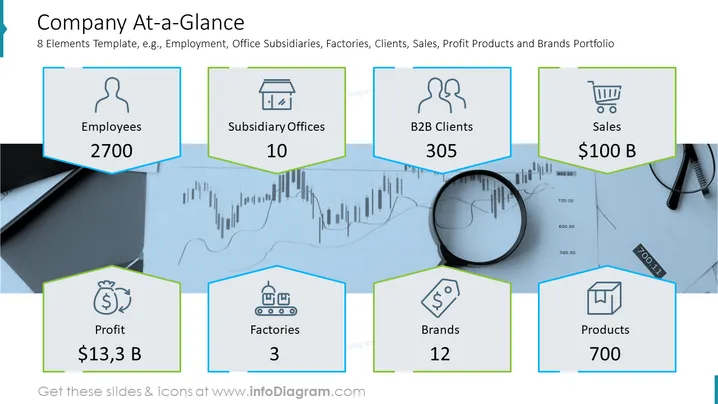
The slide is a visual summary of key company metrics. It includes data on the number of employees (2700), the number of subsidiary offices (10), business-to-business clients (305), and sales revenue ($100 Billion). It also highlights the company's profit ($13.3 Billion), the number of factories (3), brand portfolio (12), and product count (700). Each metric is presumably a current measurement and reflects the company's scale and business reach.
Graphical Look:
- The background of the slide is a faint stock market chart with a magnifying glass, implying a detailed analysis of the company.
- Each metric is displayed in a hexagon with a colored border—blue for employees, subsidiary offices, sales, and products; green for B2B clients, profit, factories, and brands.
- Simple, monochromatic icons are placed at the top of each hexagon, corresponding to the metric it represents.
- The color scheme is blue and green, with a white and grey stock market chart.
- Text within the hexagons is bold and dark, contrasting with the lighter background for readability.
- The slide has a balance between graphical elements and textual information, with a clean and modern aesthetic.
Overall, the slide has a modern, analytical feel, using a business-like blue and green color scheme, and employs hexagonal shapes and icons for a structured and professional presentation of company data.
Use Cases
Such a slide could be used in various business presentation scenarios including:
- An executive summary for stakeholders or investors to quickly grasp the company's operational scale and financial health.
- Part of an annual report presentation summarizing key business metrics.
- A section in a business plan or investment pitch to illustrate the company's current market position and capabilities.
- Internal corporate meetings to brief employees on the overall health and direction of the company.
- Marketing or sales presentations to build credibility and demonstrate the company's success to potential clients or partners.
How to Edit
How to edit text & colors

How to expand / shorten diagram

How to Replace Icons in infoDiagram PPT


