

Your graphics add a nice touch to my presentations and I recently used them for one of my all-hands meetings. Your toolbox adds professionalism to my slides. Instead of using standard clipart.
Claude Jones, Director of Engineer, @Walmartlabs, USA

Your graphics add a nice touch to my presentations and I recently used them for one of my all-hands meetings. Your toolbox adds professionalism to my slides. Instead of using standard clipart.
Claude Jones, Director of Engineer, @Walmartlabs, USA
I needed a fresh look at some of my slides. I've tried to find a way to create a paintbrush effect, to underline, accentuate, add some color and the handwritten markers were just the things. Very easy to use, easy to size, change the color. It was an affordable, perfect solution and I'm happy to recommend it.
Anonymous, US
The crisp, clean look of the graphics, and the fact that it allowed me to easily edit and change the colors to match the template was my main reason for purchasing them.
Brandie Jenkins, E-learning Developer, USA
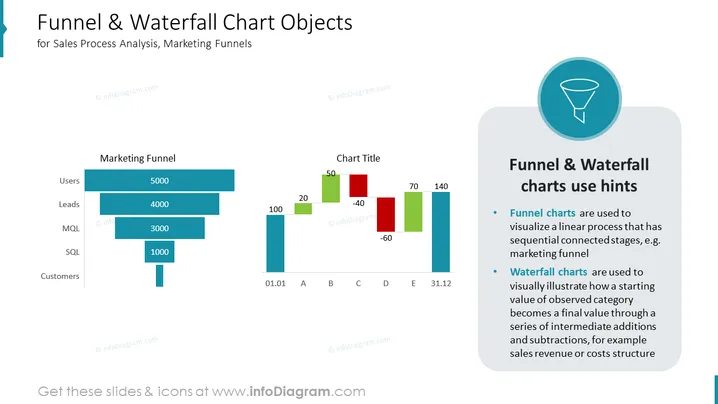
This PowerPoint slide is titled "Funnel & Waterfall Chart Objects" and is intended for Sales Process Analysis, Marketing Funnels. It presents a "Marketing Funnel" on the left, illustrating a decrease in quantity from users to customers, with numbers like 5000 for users and 1000 for SQL. On the right, there is a "Waterfall Chart" with positive and negative values, such as 20 for 'B' and -40 for 'C', and a "Funnel & Waterfall charts use hints" section explaining the application of funnel charts in representing linear processes and waterfall charts in showing how starting values change through additions and subtractions.
The overall look of the slide is professional and straightforward, with a well-organized layout that uses color and positioning effectively to convey information about funnel and waterfall charts.



