

Your graphics add a nice touch to my presentations and I recently used them for one of my all-hands meetings. Your toolbox adds professionalism to my slides. Instead of using standard clipart.
Claude Jones, Director of Engineer, @Walmartlabs, USA

Your graphics add a nice touch to my presentations and I recently used them for one of my all-hands meetings. Your toolbox adds professionalism to my slides. Instead of using standard clipart.
Claude Jones, Director of Engineer, @Walmartlabs, USA
I needed a fresh look at some of my slides. I've tried to find a way to create a paintbrush effect, to underline, accentuate, add some color and the handwritten markers were just the things. Very easy to use, easy to size, change the color. It was an affordable, perfect solution and I'm happy to recommend it.
Anonymous, US
The crisp, clean look of the graphics, and the fact that it allowed me to easily edit and change the colors to match the template was my main reason for purchasing them.
Brandie Jenkins, E-learning Developer, USA
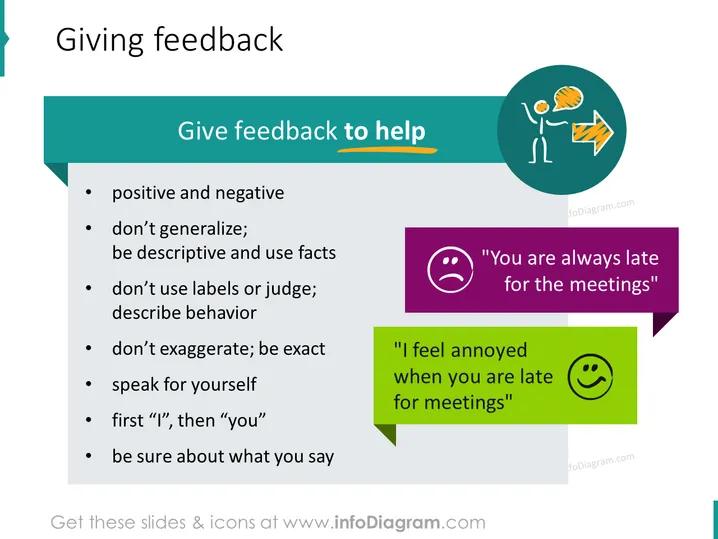
The slide titled "Giving feedback" focuses on guidelines for providing constructive feedback. The bulleted list includes points such as giving both positive and negative feedback, avoiding generalizations in favor of descriptive and factual statements, refraining from using labels or being judgmental, being precise rather than exaggerating, speaking from personal experience rather than accusing, using "I" statements before "you" statements, and being confident in the feedback provided. Each point is an admonition to communicate in a manner that is helpful and encourages improvement without causing defensiveness.
The slide has a clean and professional design with a balanced layout using colors and icons to visually separate and emphasize key points. The use of contrasting colors for the speech bubbles immediately draws attention to the examples of constructive versus negative feedback.



