

Your graphics add a nice touch to my presentations and I recently used them for one of my all-hands meetings. Your toolbox adds professionalism to my slides. Instead of using standard clipart.
Claude Jones, Director of Engineer, @Walmartlabs, USA

Your graphics add a nice touch to my presentations and I recently used them for one of my all-hands meetings. Your toolbox adds professionalism to my slides. Instead of using standard clipart.
Claude Jones, Director of Engineer, @Walmartlabs, USA
I needed a fresh look at some of my slides. I've tried to find a way to create a paintbrush effect, to underline, accentuate, add some color and the handwritten markers were just the things. Very easy to use, easy to size, change the color. It was an affordable, perfect solution and I'm happy to recommend it.
Anonymous, US
The crisp, clean look of the graphics, and the fact that it allowed me to easily edit and change the colors to match the template was my main reason for purchasing them.
Brandie Jenkins, E-learning Developer, USA
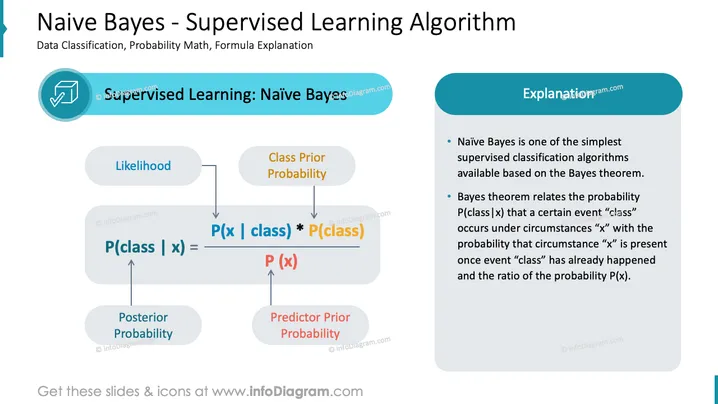
The slide introduces the Naive Bayes algorithm as a simple supervised classification method derived from Bayes theorem. It explains the formula P(class | x) which is the 'Posterior Probability' of a class given a predictor by multiplying the 'Likelihood' of the predictor given the class with the 'Class Prior Probability' and normalizing it by the 'Predictor Prior Probability'. Each term is elaborated: Likelihood signifies how often certain data features are associated with the class; Class Prior Probability indicates the general frequency of the class; and Predictor Prior Probability refers to the frequency of the predictor feature.
The slide uses a professional and clean design with a balance of text and visuals. The color scheme is consistent with blue and grey tones, creating a cohesive and informative presentation.



