

Your graphics add a nice touch to my presentations and I recently used them for one of my all-hands meetings. Your toolbox adds professionalism to my slides. Instead of using standard clipart.
Claude Jones, Director of Engineer, @Walmartlabs, USA

Your graphics add a nice touch to my presentations and I recently used them for one of my all-hands meetings. Your toolbox adds professionalism to my slides. Instead of using standard clipart.
Claude Jones, Director of Engineer, @Walmartlabs, USA
I needed a fresh look at some of my slides. I've tried to find a way to create a paintbrush effect, to underline, accentuate, add some color and the handwritten markers were just the things. Very easy to use, easy to size, change the color. It was an affordable, perfect solution and I'm happy to recommend it.
Anonymous, US
The crisp, clean look of the graphics, and the fact that it allowed me to easily edit and change the colors to match the template was my main reason for purchasing them.
Brandie Jenkins, E-learning Developer, USA
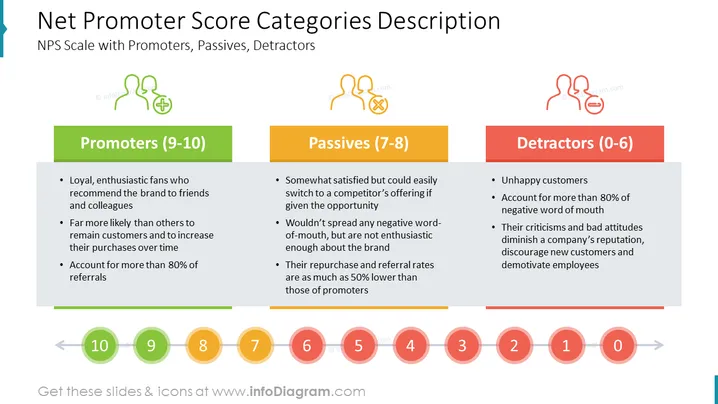
##Slide content This PPT slide shows the NPS Categories Description: Promoters, Passives, and Detractors. The promoters (9-10) represent loyal and enthusiastic fans who recommend the brand to friends and colleagues. They are far more likely than others to remain customers and increase their purchases over time. They account for more than 80% of referrals. The passives (7-8) represent somewhat satisfied but could easily switch to a competitor's offering if given the opportunity. They wouldn't spread any negative word-of-mouth but are not enthusiastic enough about the brand. Their repurchase and referral rates are as much as 50% lower than those of promoters. The detractors (0-6) are unhappy customers. They account for more than 80% of negative word-of-mouth. Their criticisms and bad attitudes diminish a company's reputation, discourage new customers, and demotivate employees. You can use this PowerPoint slide if you are a marketing officer who wants to present your company's Net Promoter Score Categories. You can download this template on Google Slides and Keynote.
##Slide Infographic Description: White Background, Text Box, Colorful NPS Scale, Promoter Icon, Fan Icon, Passive Icon, Unconcerned Icon, Detractor Icon, Critic Icon



