Reviews
Ihre Grafiken verleihen meinen Präsentationen eine nette Note, und ich habe sie kürzlich für eines meiner All-Hands-Meetings verwendet. Ihre Toolbox verleiht meinen Folien Professionalität, anstatt Standard-Clipart zu verwenden.
Ich brauchte einen neuen Blick auf einige meiner Folien. Ich habe versucht, einen Weg zu finden, einen Pinselschlag-Effekt zu erzielen, um zu unterstreichen, hervorzuheben, Farbe hinzuzufügen, und die handgeschriebenen Markierungen waren genau das Richtige. Sehr einfach zu bedienen, leicht in der Größe zu ändern, die Farbe zu ändern. Es war eine erschwingliche, perfekte Lösung und ich empfehle sie gerne weiter.
Die klare, saubere Optik der Grafiken und die Tatsache, dass ich die Farben leicht bearbeiten und an die Vorlage anpassen konnte, war mein Hauptgrund für den Kauf.
Description
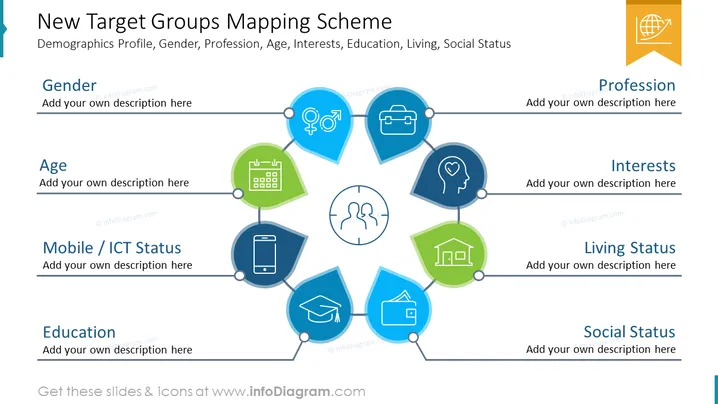
##Slide contents: The Target Group Analysis PowerPoint Template can be used if you want to give a presentation about your potential customers. It is the starting point of all marketing campaigns. You can use this slide if you are a marketing manager and want to present your target audience analysis to your employees. Target customers are people who have similar needs. It is important for market research and can help you succeed, especially when you clearly define your target audience. You can gain value and trust, which are important for customer satisfaction. This PPT slide is similar to a buyer persona. Several factors determine your target group. This template contains some factors that you can use in your presentation: the demographic profile, gender, profession, age, interests, education, place of residence, and marital status. You have to create a clear marketing strategy and focus your marketing efforts on understanding your potential customers. You have to know your target customers. One way you can do that is to conduct surveys or use google analytics which can be helpful in your marketing campaigns. You can download this template on Google Slides. ##Slide Infographic Description: White Background, Text Box, Circle Diagram, Gender Icon, Occupation Icon, Job Icon, Work Icon, Interest Icon, Preference Icon, House Icon, Wallet Icon, Income Icon, Education Icon, Degree Icon, Mobile Icon, Phone Icon, Calendar Icon
How to Edit
How to edit text & colors

How to expand / shorten diagram

How to Replace Icons in infoDiagram PPT


