Reviews
Sus gráficos añaden un toque agradable a mis presentaciones y recientemente los usé para una de mis reuniones generales. Su conjunto de herramientas añade profesionalismo a mis diapositivas. En lugar de usar imágenes prediseñadas estándar.
Necesitaba un aspecto fresco para algunas de mis diapositivas. Había intentado encontrar una forma de crear un efecto de pincel, de subrayar, acentuar, añadir algo de color y los marcadores escritos a mano fueron justo lo que necesitaba. Muy fácil de usar, fácil de ajustar el tamaño, cambiar el color. Fue una solución asequible y perfecta, y estoy feliz de recomendarla.
El aspecto nítido y limpio de los gráficos, y el hecho de que me permitiera editar y cambiar fácilmente los colores para que coincidieran con la plantilla fue mi principal razón para comprarlos.
Description
Smart Home Applications Diagram
Slide Content
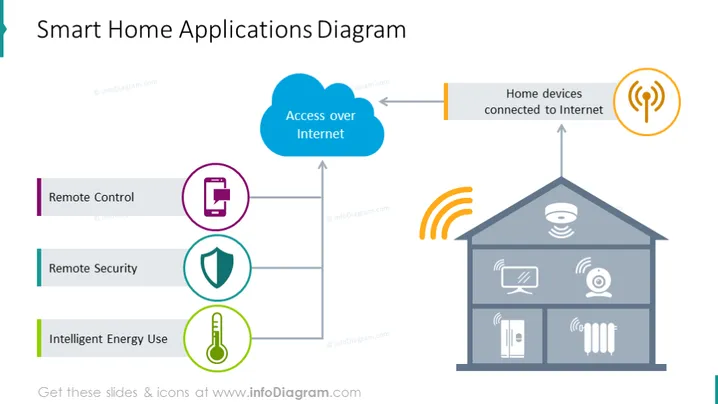
This PowerPoint slide is titled "Smart Home Applications Diagram" and outlines various aspects of smart home technology. It includes three key applications: Remote Control, symbolizing the ability to manage home devices from a distance; Remote Security, indicating the use of technology to monitor and protect the home; and Intelligent Energy Use, reflecting the smart management of energy consumption. The slide shows a bidirectional link between these applications and a graphical representation of a house with connected devices, signifying their interconnectivity through internet access.
Graphical Look
- The slide background is white, providing a clean and neutral canvas for the other elements.
- The title "Smart Home Applications Diagram" is presented in bold, dark text at the top of the slide.
- To the left, three horizontal blocks are aligned vertically, each representing different smart home applications. They have colored icons and text descriptions:
- A purple block with an icon depicting a mobile device or remote, labeled "Remote Control."
- A blue block with a shield icon, labeled "Remote Security."
- A green block with a thermostat icon, labeled "Intelligent Energy Use."
- Center-right features a stylized two-story house graphic in grey, with icons representing various smart devices (like a camera, TV, and thermostat) inside.
- Above the house, there are two icons:
- A blue cloud with an arrow pointing from it to the house and vice versa, labeled "Access over Internet."
- An orange Wi-Fi symbol indicating connectivity.
- Lines connect the application blocks to the cloud, showing their relationship to the internet-connected smart home.
The graphical look of the slide is clean and modern, with a simplified color palette that aids in distinguishing different elements. The use of icons and connecting lines creates an easily understandable visual representation of how smart home applications are interconnected through the internet.
Use Cases
- Presenting the concept of smart home technology and its common applications in a tech company's product pitch or investor presentation.
- Educating consumers on the benefits and features of smart home systems during a sales demo or at a technology trade fair.
- Explaining to employees or stakeholders how a smart home ecosystem works during an internal company meeting or training session.
- Offering an overview of market trends and opportunities in the smart home industry for a research presentation or a consultancy project.
How to Edit
How to edit text & colors

How to expand / shorten diagram

How to Replace Icons in infoDiagram PPT


