Reviews
Ihre Grafiken verleihen meinen Präsentationen eine nette Note, und ich habe sie kürzlich für eines meiner All-Hands-Meetings verwendet. Ihre Toolbox verleiht meinen Folien Professionalität, anstatt Standard-Clipart zu verwenden.
Ich brauchte einen neuen Blick auf einige meiner Folien. Ich habe versucht, einen Weg zu finden, einen Pinselschlag-Effekt zu erzielen, um zu unterstreichen, hervorzuheben, Farbe hinzuzufügen, und die handgeschriebenen Markierungen waren genau das Richtige. Sehr einfach zu bedienen, leicht in der Größe zu ändern, die Farbe zu ändern. Es war eine erschwingliche, perfekte Lösung und ich empfehle sie gerne weiter.
Die klare, saubere Optik der Grafiken und die Tatsache, dass ich die Farben leicht bearbeiten und an die Vorlage anpassen konnte, war mein Hauptgrund für den Kauf.
Description
Top Business Customers Comparison Analysis Template
Slide Content
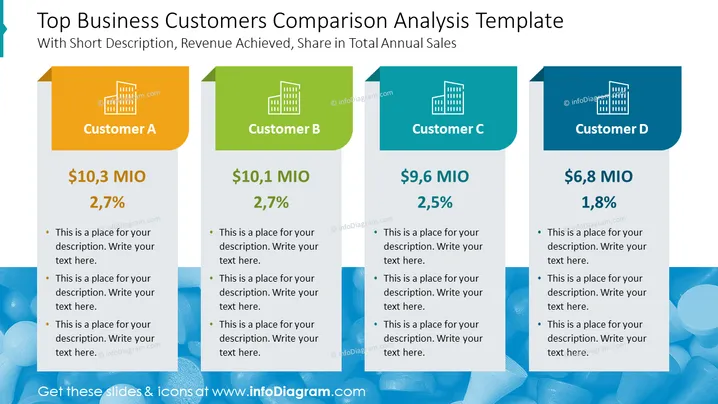
The PowerPoint slide titled "Top Business Customers Comparison Analysis Template" presents a comparative analysis of top customers with respect to revenue and proportion of total annual sales. Four separate blocks labeled Customer A, Customer B, Customer C, and Customer D display their respective revenue figures and sales percentages. Each block provides bullet points for additional descriptions, helping the audience understand how each customer contributes to the business's overall sales.
Graphical Look
- The slide background is white with a grayish-blue banner on top.
- Four colorful rectangular columns represent individual customers, with each column divided into three sections.
- The top section of each column showcases the customer's designation (A, B, C, D) against a building icon, with distinct colors for each (orange, green, blue, and dark blue).
- The middle section displays the revenue in 'MIO' followed by a percentage, emphasizing the customer's contribution to total sales.
- The bottom section contains placeholder text for a description, with bullet points for detailed explanations.
- All text is in bold, sans-serif font ensuring readability.
The overall look of the slide is clean and modern, with a clear differentiation between segments through the use of color. The layout supports easy comparison and quick understanding between the customer's categories and their data points.
Use Cases
- Present quarterly or annual sales figures to stakeholders demonstrating the contribution of each key customer.
- Use in strategy meetings to focus on customer revenue impact and discuss customer relationship management.
- Compare performance metrics during a sales team briefing to highlight targets and accomplishments with top customers.
- Incorporate into investor presentations for a visual representation of customer portfolio distribution and its direct influence on revenue.
How to Edit
How to edit text & colors

How to expand / shorten diagram

How to Replace Icons in infoDiagram PPT


