Reviews
Ihre Grafiken verleihen meinen Präsentationen eine nette Note, und ich habe sie kürzlich für eines meiner All-Hands-Meetings verwendet. Ihre Toolbox verleiht meinen Folien Professionalität, anstatt Standard-Clipart zu verwenden.
Ich brauchte einen neuen Blick auf einige meiner Folien. Ich habe versucht, einen Weg zu finden, einen Pinselschlag-Effekt zu erzielen, um zu unterstreichen, hervorzuheben, Farbe hinzuzufügen, und die handgeschriebenen Markierungen waren genau das Richtige. Sehr einfach zu bedienen, leicht in der Größe zu ändern, die Farbe zu ändern. Es war eine erschwingliche, perfekte Lösung und ich empfehle sie gerne weiter.
Die klare, saubere Optik der Grafiken und die Tatsache, dass ich die Farben leicht bearbeiten und an die Vorlage anpassen konnte, war mein Hauptgrund für den Kauf.
Description
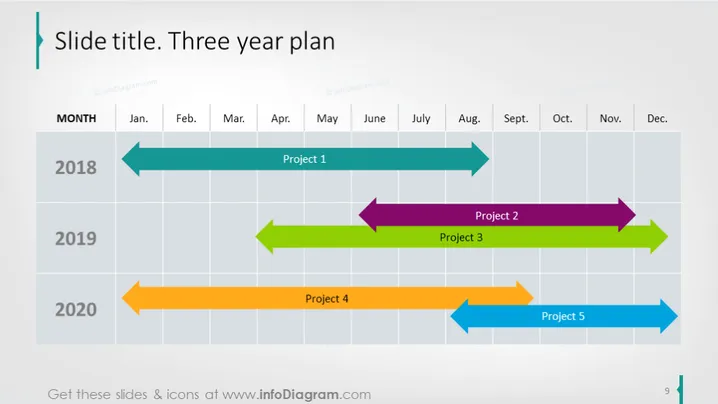
Slide title. Three year plan
Slide Content
The slide displays a three-year project timeline mapped over a monthly grid, spanning from January to December each year. Each year—2018, 2019, and 2020—has differently colored, horizontal arrow graphics indicating time spans for five distinct projects. Project 1, commencing in 2018, extends for several months, as do the subsequent projects in the following years, with Project 2 and Project 3 occurring in 2019, and Projects 4 and 5 taking place in 2020. The varied lengths of the arrows suggest differing project durations.
Graphical Look
- The slide has a clear, uncluttered layout with generous white space around the main content.
- The background of the slide is white with a faded grid that serves as a timeline.
- The title of the slide is large and positioned in the upper left corner, with a decorative vertical bar extending downwards.
- Colored arrows representing different projects are distributed across the timeline—light blue, purple, green, orange, and blue, each with a project label.
- The months of the year are displayed in a row at the top of the timeline, serving as headers for the grid.
- The years 2018, 2019, and 2020 are on the left side of the grid, indicating the start of each row.
- The timeline is sequential, with each project arrow's tail at the starting month and the arrowhead pointing towards the ending month.
The overall design is modern and business-like, with a clean color scheme that effectively distinguishes between the different projects. The use of arrows not only delineates the duration of the projects but also implies progress in a forward-moving direction.
Use Cases
- To visually communicate the duration and overlap of multiple projects in a business or organizational setting.
- To present a high-level overview of project timelines during strategic planning sessions.
- For use in progress reports and project status updates to stakeholders or team members.
- To facilitate discussions about resource allocation and management across a multi-year project portfolio.
How to Edit
How to edit text & colors

How to expand / shorten diagram

How to Replace Icons in infoDiagram PPT


