Reviews
Your graphics add a nice touch to my presentations and I recently used them for one of my all-hands meetings. Your toolbox adds professionalism to my slides. Instead of using standard clipart.
I needed a fresh look at some of my slides. I've tried to find a way to create a paintbrush effect, to underline, accentuate, add some color and the handwritten markers were just the things. Very easy to use, easy to size, change the color. It was an affordable, perfect solution and I'm happy to recommend it.
The crisp, clean look of the graphics, and the fact that it allowed me to easily edit and change the colors to match the template was my main reason for purchasing them.
Description
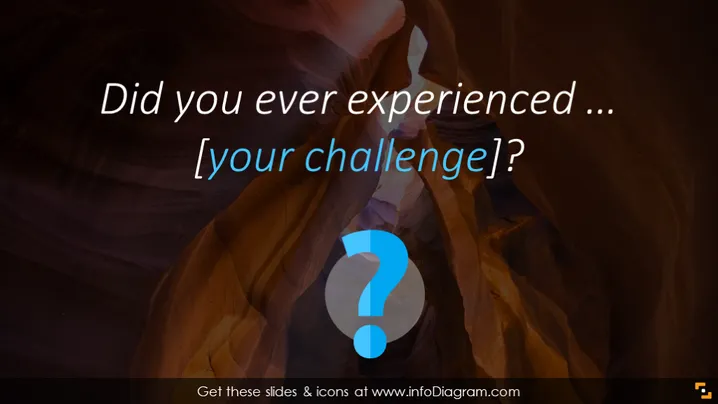
Did you ever experienced ... [your challenge]?
Slide Content
This PowerPoint slide is designed to engage the audience with a provocative question, prompting them to consider a challenge or problem they may have faced in the past. The text "[your challenge]" suggests that this is a template meant to be customized with a specific issue relevant to the presentation's topic. It's a tool for connecting with the audience on a personal level by addressing common experiences or difficulties.
Graphical Look
- The slide background features a full-bleed image with a natural, cavernous rock formation in brown and orange hues, creating a sense of depth and intrigue.
- Overlaid centrally on the image is a large, opaque question mark encapsulated in a circle, which draws attention to the theme of inquiry and introspection.
- The question mark is blue, which introduces a contrasting color that stands out against the earthy background tones.
- The text is white, ensuring high visibility, with the slide title in a large, bold font for emphasis and the placeholder text "[your challenge]?" in a slightly smaller size to denote customization.
- The font style is sans-serif, contributing to a modern and clean aesthetic.
- The layout is sparse, with ample negative space around the question mark and text to avoid visual clutter and maintain focus on the key message.
The slide has a dramatic and engaging visual composition due to the striking background image and prominent question mark symbol. The contrasting colors and minimalist text elements aim to captivate the audience's attention and stimulate curiosity.
Use Cases
- To introduce a problem-solving session where participants reflect on challenges they have previously encountered.
- As an opening slide in a workshop aimed at personal or professional development, where the central theme involves overcoming obstacles.
- In a sales or marketing presentation to address common pain points that a product or service is designed to alleviate.
- During a coaching or motivational seminar to prompt audience members to identify and discuss their own life or work challenges.
How to Edit
How to edit text & colors

How to expand / shorten diagram

How to Replace Icons in infoDiagram PPT


