Reviews
Your graphics add a nice touch to my presentations and I recently used them for one of my all-hands meetings. Your toolbox adds professionalism to my slides. Instead of using standard clipart.
I needed a fresh look at some of my slides. I've tried to find a way to create a paintbrush effect, to underline, accentuate, add some color and the handwritten markers were just the things. Very easy to use, easy to size, change the color. It was an affordable, perfect solution and I'm happy to recommend it.
The crisp, clean look of the graphics, and the fact that it allowed me to easily edit and change the colors to match the template was my main reason for purchasing them.
Description
Employees Satisfaction as a Part of Our Social Responsibility
Slide Content
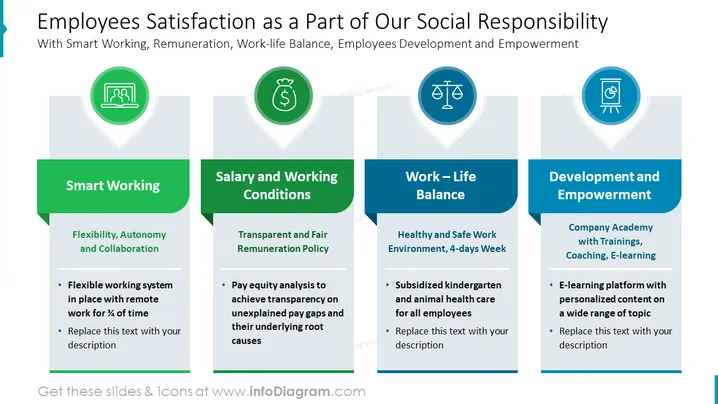
The slide is focusing on employee satisfaction within the context of corporate social responsibility. It breaks down the topic into four key areas: Smart Working, Salary and Working Conditions, Work-Life Balance, and Development and Empowerment. Smart Working is about fostering flexibility, autonomy, and collaboration, hinting at a flexible system with options for remote work. Salary and Working Conditions emphasize transparent policies and pay equity analysis to address pay gaps. Work-Life Balance advocates for a healthy work environment and support outside work, including subsidized childcare or pet care. Lastly, Development and Empowerment discuss investing in employee growth through a company academy with various training and e-learning options, signifying a commitment to professional development.
Graphical Look
- The slide has a clear blue and green color scheme.
- Four large banner-like shapes, each featuring a white icon inside a green circle set within a location marker, representing different aspects of employee satisfaction.
- Under each banner, there's a corresponding title in bold white text against a darker green background.
- Each section has a light gray textbox below the title with bullet points and a placeholder text indicating where to add descriptions.
- Horizontal divider lines separate the titles from the bullet points within the textboxes.
- The icons depict a laptop (Smart Working), a money bag (Salary and Working Conditions), a balance scale (Work-Life Balance), and a presentation board (Development and Empowerment).
The overall look of the slide is professional and modern, with a cohesive color scheme that visually distinguishes between different topics. The use of icons helps to quickly convey the subject matter associated with each section.
Use Cases
- Presenting company initiatives to improve employee satisfaction during internal meetings.
- Providing an overview of human resource policies at a corporate social responsibility reporting event.
- Outlining benefits in recruitment presentations to prospective employees.
- Showcasing company culture and values at investor or stakeholder meetings.
How to Edit
How to edit text & colors

How to expand / shorten diagram

How to Replace Icons in infoDiagram PPT


